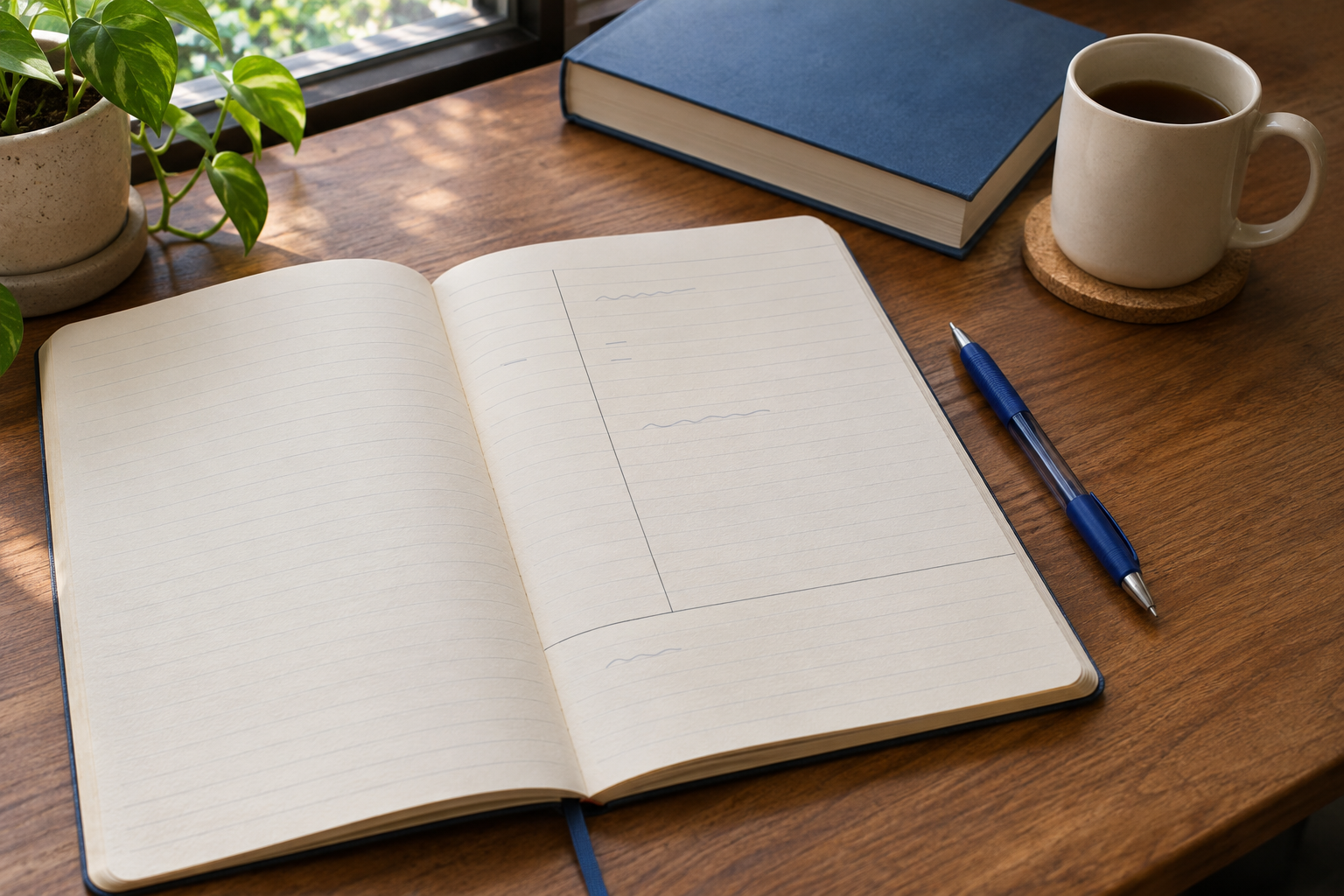
The Cornell note-taking method separates a page into three working areas: notes on the right, questions or cues on the left, and a short summary at the bottom. Capture the lesson first. Afterwards, add questions, explain the answers with the notes covered, and check what you missed.
The useful part is what you do with the page. A notebook with neat columns can still leave you rereading everything without checking your understanding. A rough page becomes useful when it helps you find the main ideas, spot a gap and explain a concept without seeing the explanation.
Here is how to build that kind of page, including a worked example you can adapt to your next class.
What each part of a Cornell notes page does
#Cornell education professor Walter Pauk developed the system. Cornell University's Learning Strategies Center still teaches it as one option among several note-taking approaches, rather than a compulsory format for every learner.
The page has three jobs:
| Area | What belongs there | What it helps you do |
|---|---|---|
| Main notes, on the right | Explanations, examples, diagrams and important conditions from the lesson | Preserve enough meaning to reconstruct the idea |
| Cues, on the left | Questions, key terms or prompts matched to the notes beside them | Find and test a particular idea |
| Summary, across the bottom | A short explanation of the page's central message | Connect the details into a useful whole |
For a first attempt, draw a vertical line roughly a third of the way across a sheet, leaving the larger area on the right. Draw a horizontal line near the bottom for a few sentences. These are practical starting proportions, not a test of whether your notes count as Cornell notes.
Leave enough room for your handwriting, equations or diagrams. If your instructor requires a specific template for submitted notes, follow that requirement. Otherwise, the layout should serve the material.
Add the course, topic, date and page number at the top. Include a slide number, chapter section or other reference when it will help you check a confusing point later. A page called “Lecture notes” becomes difficult to find after several weeks; “Research methods: comparing samples, page 2” gives you something useful to search for.
During class: capture meaning in the main column
#Use the wide column for the lesson itself. Keep the cue column mostly free until you can see how the ideas fit together. Trying to write polished questions while the lecturer moves to a new explanation can make you miss both.
Record the central claim, how it is explained, and an example that makes it understandable. Include conditions that limit a statement. A word such as “usually,” “unless” or “assuming” can change the entire answer, so do not remove it just to shorten a line.
For example, “compare two groups” is too vague to be useful later. “Compare groups measured in the same way; check whether another difference could explain the result” preserves a line of reasoning. You can abbreviate familiar words, but keep enough language to recover the meaning.
Use indentation or short bullets to separate a main idea from its supporting example. When the topic changes, leave a gap or start a new page. An uninterrupted wall of text makes it harder to place useful questions beside the right explanation afterwards.
A simple mark can keep uncertainty visible. Put a question mark next to an unfinished explanation or write “check slide 8.” Do not fill a missing step with a guess just to make the page look complete. Continue listening and return to the gap after class.
If slides are provided, avoid copying every sentence merely because it is displayed. Note what the instructor adds: the reason for a step, a comparison, a qualification or a worked explanation. Keep the slide reference so that the notes and teaching material can work together.
After class: repair the page before creating cues
#Read the notes while the lesson is still reasonably fresh. Complete abbreviations you might forget, finish a broken sentence and check the question marks. Cornell's guidance recommends forming questions as soon after class as possible; it does not establish a universal deadline after which notes become useless.
Separate three different problems. A missing word may be easy to recover from the slides. A missing explanation may need the textbook or a classmate's comparison. A concept that still makes no sense may need an instructor's help. Copying a sentence into the gap is not enough if you still cannot explain it.
Mark additions clearly when the distinction matters. For reading or essay notes, keep the source's claim separate from your own interpretation. If you preserve an exact quotation, identify it as a quotation and retain the page reference. Cornell columns do not replace your course's citation requirements.
Do the smallest repair that makes the page usable. You do not need to rewrite the whole lecture in perfect handwriting. If a line is legible and accurate, keep it. Spend your effort on the part you could not explain tomorrow.
Write cue questions that ask for a real answer
#A cue can be a keyword, but a question often tells you more clearly what to retrieve. “Advantages” gives little direction. “Why might this method be useful when the two examples look similar?” asks for a comparison and a reason.
Match each question to the material next to it. A small group of notes may need one question; a dense explanation may need several. There is no useful fixed question count for every page.
Try different kinds of prompts:
- Definition: What does this term mean in this course?
- Explanation: Why does this step come before the next one?
- Comparison: What changes between these two cases?
- Application: How would I recognise this situation in a new example?
- Limitation: When would this explanation stop applying?
Avoid questions that reveal the answer in their wording. “Why is method A better because it uses fewer steps?” has already supplied much of the response. “What tradeoff separates methods A and B?” leaves you something to explain.
Also avoid a cue so broad that it asks for the entire lecture. Split “Explain research methods” into questions about the particular definitions, decisions and limitations on that page. The cue column works best as an index to specific thinking, rather than a second copy of the notes.
A worked Cornell notes example
#This is an invented mini-lesson about checking a classroom comparison. It demonstrates the note-taking process; it is not a report of a real experiment or a claim that a particular study technique improves grades.
Imagine a teacher describes two fictional groups. Group A used a new revision sheet and averaged 78 on a practice quiz. Group B used its usual notes and averaged 70. The teacher asks what information would be needed before concluding that the sheet caused the difference.
During the explanation, the main column might contain these rough notes:
- A: new sheet, average 78. B: usual notes, average 70.
- Observed gap = 8 points. Does not explain why gap happened.
- Need starting level, same quiz, same conditions, how groups chosen.
- Could A already know more? Missing info: earlier scores.
- Keep conclusion limited to what comparison actually shows.
Those notes retain the example, the numerical difference and the teacher's main caution. They also leave a specific gap to check. Writing only “new sheet better by 8” would turn an observation into an unsupported explanation.
After class, the completed page could look like this. The table represents the two upper columns; the summary sits below them on an actual sheet.
| Cue or question | Main notes |
|---|---|
| What was observed? | In the fictional example, Group A averaged 78 and Group B averaged 70 on a practice quiz. The observed difference was 8 points. |
| Why is the difference not a full explanation? | The scores show a difference between these groups, but the description does not establish what caused it. |
| What should be checked? | Earlier understanding, how students entered each group, and whether the quiz and conditions were comparable. |
| What important information is missing? | The example does not give earlier scores. Check the lesson material before claiming the groups started at the same level. |
| What conclusion fits the notes? | Group A scored higher in this example. More information is needed to attribute that difference to the revision sheet. |
Summary: The fictional groups differed by 8 points, but a score difference alone does not explain its cause. Before judging the revision sheet, check the groups' starting position and the comparison conditions.
Notice what the summary leaves out. It does not reproduce every question or invent the missing earlier scores. It connects the observation, the uncertainty and the next check.
Now cover the right side and try the third question. If your answer is only “check the scores,” the cue has exposed a gap. Uncover the notes, identify the missing comparison conditions and explain them again. That correction is more useful than adding another colour to the table.
Use the summary to check the page's main message
#Write the summary after you have clarified the page and considered its questions. Aim for a short explanation of how the important ideas connect. A sentence or two may be enough for one page; a complex section may need a few more.
A weak summary says, “Today we learned about comparisons.” It names the topic but gives you nothing to work with. The worked example's summary explains what the score difference shows, what remains uncertain and what needs checking.
If you cannot write a summary without repeating isolated fragments, look for the missing connection. Are you unclear about the main claim? Did the example contradict your interpretation? Is a definition missing? Use that difficulty to decide what to ask, rather than hiding it behind a vague closing sentence.
For a lecture spanning several pages, a brief summary on each page helps navigation. You can add a separate lecture-level explanation if it answers a different need, but you do not need to repeat the same paragraph at the bottom of every sheet.
Cover, explain, check and reflect
#Cornell's method includes reciting from cues, reflecting on the material and returning to earlier notes. In practice, make the answer column genuinely unavailable: cover it with paper, fold the page or hide it on screen. Looking sideways at a visible answer makes it difficult to tell what you remembered.
Read one cue and explain the answer in your own words. Speaking is convenient when you have privacy; writing a rough answer works in a quiet shared space. For a process, reproduce the important stages. For a diagram, redraw and label it. For a calculation, do the calculation rather than naming the formula.
Uncover the notes and compare meanings. You do not need identical wording unless the task requires an exact definition or quotation. You do need the relevant condition, relationship or reasoning. Mark the point you missed, correct it and try that cue again later.
Reflection goes beyond reproducing the page. Ask how the idea relates to an earlier lesson, which case would challenge it, or where you could apply it. In the fictional example, you might ask what would change if both groups had identical earlier scores. That is a question to investigate, not permission to invent the answer and insert it as lecture evidence.
Return to older pages regularly. Choose how much review they need from the course workload and the gaps your checks reveal. A weekly glance through headings is not a substitute for answering difficult cues, and no single review duration guarantees mastery.
Adapt the page to the subject
#Equations and worked problems
#Give a multi-line solution enough width. Keep the original problem, assumptions, units and essential working together. Put questions such as “Why is this operation valid here?” or “What condition lets me use this relationship?” beside the relevant stage.
A successful cue answer should include the reasoning or a fresh attempt at the problem. Remembering the name of a method is different from being able to carry it out. If the problem cannot fit comfortably in columns, use a full-width worked page and a separate cue sheet with clear page references.
Diagrams and visual subjects
#Preserve the diagram's space rather than shrinking it until labels become unreadable. Place the cue beside it or refer to a labelled figure on the next page. Test yourself by sketching the structure, explaining an arrow or distinguishing two similar features.
If the relationship is mainly spatial, a concept map or full-page drawing may communicate it more clearly. You can still create cue questions without forcing every figure into the same box.
Reading and discussion
#For reading, capture the author's main claim, reasons, evidence and relevant page locations. Write your questions in the cue column, then distinguish an explanation of the author's argument from your own response to it.
For a discussion, do not force a final conclusion when the class explored competing interpretations. A useful summary can identify the disagreement and the evidence each interpretation needs. The aim is a faithful record you can think with.
Paper, digital pages and practical limits
#Use a notebook, tablet or document layout that lets you separate and hide the answers. A two-column table with a summary underneath can be sufficient digitally. Check that the layout remains usable on the screen or printout you actually study from.
Choose a format you can maintain during class. If drawing lines, moving text or changing colours repeatedly makes you fall behind, simplify it. Keep a consistent filename or notebook index so the finished page is easy to retrieve.
Cornell notes are a poor fit when the layout fragments an argument, squeezes a diagram or takes more attention than the lesson. An outline, annotated slides or a full worked solution can be a better capture format for that session. Add questions afterwards if they help.
Try the method on one lesson before reorganising an entire course. Check whether you can find the explanation, answer the cues and identify what still needs help. Keep the parts that make your notes usable. The next useful action is a page you can learn from, not a semester of empty templates.