If you forgot your UPI PIN, you need to reset it. If you remember your current PIN and simply want a new one, you can change it. If you think someone else may know your UPI PIN, reset it immediately, check your recent bank activity, and contact your bank through official support if anything looks unauthorized.
A UPI PIN is the passcode used to authorize UPI transactions from your linked bank account. Treat it like a bank approval code, not like a username or phone number.
Important: This guide is for general education. It is not legal, financial, credit, investment, tax, loan, or personalized banking advice. If money has moved without your permission, contact your bank or payment provider immediately through official channels.
UPI PIN Change vs Reset: The Simple Difference
#Changing and resetting sound similar, but they solve different problems.
The exact wording varies by app. One app may show “Change UPI PIN,” another may show “Forgot UPI PIN,” “Reset UPI PIN,” or “Set UPI PIN.” Always start from the official app or your bank’s app, not from a link sent by someone.
What Your UPI PIN Actually Does
#Your UPI PIN is used to approve money going out of your bank account. You may use Google Pay, PhonePe, Paytm, BHIM, your bank app, or another UPI app, but the safety rule is the same: do not share your UPI PIN with anyone.
You should not need to enter a UPI PIN to receive money, refunds, cashback, prize money, or a buyer’s payment. If someone asks you to enter your PIN to “receive” money, stop and verify independently.
Common red flags include:
- “Enter your UPI PIN to receive a refund.”
- “Share your OTP so we can verify your bank account.”
- “Install this screen-sharing app so I can help.”
- “Click this payment support link immediately.”
- “You must approve this collect request to get paid.”
A genuine bank or payment support person should not ask for your UPI PIN.
If You Forgot Your UPI PIN
#If you forgot your UPI PIN, do not keep guessing. Repeated wrong attempts can cause temporary restrictions depending on the app or bank.
Use the official reset option instead.
General reset flow
#- Open your UPI app yourself.
- Go to the linked bank account section.
- Choose Forgot UPI PIN, Reset UPI PIN, or a similar option.
- Complete the verification requested by your bank or app.
- Enter the bank OTP only if you personally started the reset.
- Create a new UPI PIN.
- Test only with a small, necessary transaction if required.
Depending on your bank and app, verification may involve debit card details or Aadhaar-based verification where supported. Do not enter these details on links from SMS, WhatsApp, Telegram, social media, email, or search-result “customer care” pages.
If You Suspect Your UPI PIN Is Compromised
#Forgetting your PIN is an access problem. A compromised PIN is a safety problem.
Treat it urgently if:
- You shared your UPI PIN or OTP by mistake.
- Someone watched you enter your PIN.
- You typed banking details into a suspicious link.
- You installed a remote-access or screen-sharing app during “payment help.”
- You see unknown transactions.
- You receive OTPs or bank alerts for actions you did not start.
What to do first
#- Reset your UPI PIN from the official app.
- Do not share the OTP used during reset.
- Check recent UPI and bank transactions.
- Save screenshots, transaction IDs, SMS alerts, dates, times, and complaint numbers.
- Contact your bank immediately if there is an unauthorized debit.
- Follow your bank’s instructions for blocking, reporting, or securing the account.
Resetting the PIN is not a substitute for reporting suspected fraud. If money has already left your account, contact your bank promptly.
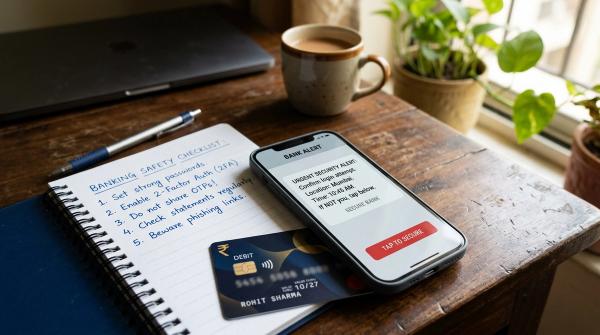
UPI PIN Safety Checklist
#Use this checklist whenever you change or reset a UPI PIN.
1. Open the app yourself
#Do not use links sent by strangers, buyers, sellers, delivery agents, or supposed support staff. Open your UPI app or bank app directly from your phone.
2. Read every OTP message
#Before entering an OTP, read what it is for. If the message mentions resetting PIN, adding a bank account, registering a device, or approving something you did not start, do not enter it.
3. Never share sensitive details
#Do not share your UPI PIN, OTP, debit card number, expiry date, CVV, banking password, or app lock code with anyone.
4. Avoid screen-sharing during payment help
#If someone can see your screen, they may see OTPs, bank names, card details, or PIN entry patterns. Do not enter sensitive payment details while screen sharing.
5. Use a strong phone lock
#Protect your phone with a passcode, fingerprint, or face unlock. If your UPI app supports app lock, enable it.
6. Choose a non-obvious PIN
#Avoid birth years, repeated digits, 1234, 0000, phone-number digits, or numbers stored in notes or chats.
7. Keep proof if anything looks wrong
#Save transaction IDs, screenshots, bank SMS alerts, caller numbers, suspicious links, and complaint references.
RBI and NPCI Context for 2026
#NPCI describes UPI PIN as a 4 to 6 digit passcode created during registration and used to authorize bank transactions. RBI’s digital payment authentication directions also reinforce that digital payments rely on authentication factors, not just trust in a message or caller.
For users, the practical lesson is simple: your phone, SIM, OTP, bank account access, and UPI PIN all matter. If one part becomes unsafe, act quickly and use only official channels.
Final Word
#Change your UPI PIN when you know the old PIN and simply want a new one. Reset your UPI PIN when you forgot it or suspect risk. If unauthorized money movement is involved, reset is only one step: contact your bank immediately, preserve proof, and avoid unofficial helpline numbers or recovery promises.