Disclaimer: This article is for general awareness only. It is not financial, legal, or personalised security advice. If your card is lost, your account looks compromised, or you suspect fraud, contact your bank only through its official app, website, card statement, or the phone number printed on your card.
Direct answer: Card tokenisation is generally safer than the old saved-card method because the merchant stores a token instead of your actual card number. But it does not replace OTP, CVV, bank authentication or basic scam checks. Never share OTP, CVV, card PIN, UPI PIN, banking password or screen access.
Online payments are part of everyday life now. We pay for food, cabs, shopping, subscriptions, recharges, flight tickets and bills with a few taps. Convenience is useful, but it also creates one common question: should you tokenise a card or avoid saving it at all?
What is card tokenisation?
#Card tokenisation replaces your real debit or credit card details with a different code called a token. Instead of a merchant storing your actual card number for future payments, the merchant stores this token.
RBI’s card tokenisation FAQ explains tokenisation as replacing actual card details with an alternate code called a token. The token is unique to a combination such as the card, token requestor and device.
That means tokenisation is mainly a stored-card safety feature. It reduces the exposure of your actual card number when you save a card inside an app or website.
Why tokenisation is safer than old saved cards
#Earlier, saving a card on a shopping app or service could mean sensitive card details were stored in more places. If a merchant-side database was leaked, actual card details could be at risk.
With tokenisation, the stored value is a token, not your full card number. If the merchant’s saved payment data is exposed, the token is less useful than your actual card details.
This is why tokenisation is useful for apps you use often, such as food delivery, travel booking, shopping, recharges, cab bookings and subscriptions.
But tokenisation is not a magic shield. It protects stored card details; it does not protect every payment mistake.
Tokenised card vs saved card vs manual entry
#What tokenisation changes
#Tokenisation changes what the merchant keeps. The merchant does not keep your actual card number for future use. It stores a token that represents your card for that specific payment setup.
This gives you the convenience of a saved card without spreading your real card details across every app you use.
What tokenisation does not protect you from
#Tokenisation cannot protect you if you personally approve a fraudulent transaction or share private information with a scammer.
It cannot save you if:
- You share an OTP on a call.
- You enter card details on a fake website.
- You install a screen-sharing or remote-access app for fake support.
- You share CVV, card PIN, banking password or UPI PIN.
- You approve a payment without reading the amount and merchant name.
- You click a fake refund, cashback, delivery or KYC link.
Think of tokenisation as safer storage, not complete fraud protection.
RBI tokenisation and authentication are different
#Tokenisation and payment authentication do different jobs.
- Tokenisation protects stored card details.
- Authentication helps confirm that the payment is being approved by the authorised user.
For many Indian online card payments, authentication may happen through OTP, bank-app approval or another bank-approved method. RBI’s digital payment authentication directions also emphasise transaction-specific authentication factors for digital payment security.
So even if your card is tokenised, you may still need OTP or another approval step.
CVV, OTP and card PIN safety checklist
#OTP safety
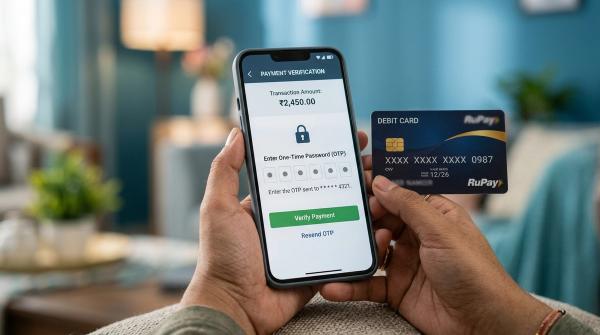
#Your OTP is only for an action you started. Do not share it with callers, delivery agents, customer care agents, WhatsApp contacts, social media accounts or anyone claiming they must “confirm”, “cancel” or “stop” a transaction.
Before entering an OTP, read the message. Check the amount, merchant name and purpose if shown.
CVV safety
#You may need to type CVV into a genuine checkout page. But never share CVV through calls, WhatsApp, SMS, email, screenshots, forms or support chats.
If a page asks for CVV, pause and confirm you are on the real app or official merchant website.
Card PIN safety
#Your card PIN is generally for ATMs or physical card machines. A normal online checkout should not ask for your ATM PIN or card PIN. If it does, stop and verify through official bank channels.
App permission and screen-sharing checks
#Be careful with apps that ask for permissions they do not need, especially SMS access, notification access, accessibility access, screen overlay permission and remote-control access.
A risky app may read OTPs, see notifications or guide you into approving a payment. Do not install screen-sharing apps for refunds, KYC updates, card blocking, reward points or cashback support calls.
When should you tokenise a card?
#Tokenising a card makes sense when you regularly use a trusted app or website. For example, you may tokenise a card on a shopping app, food app, cab app or travel booking platform you use often.
For a one-time purchase on an unfamiliar website, manual entry may feel safer because you avoid saving anything. But manual entry is not automatically safe if the website itself is fake.
The safer rule is simple: use trusted apps, check the payment page, read OTP messages and never share sensitive details with another person.
How to remove or review tokenised cards
#You can usually remove a tokenised card from the merchant app or through your bank’s official card-management options.
Check sections such as:
- Payment methods
- Saved cards
- Wallet
- Manage payments
- Card controls
- Token management
- Online transactions
Inside the merchant app, look for options like Remove, Delete, De-tokenise, Unlink or Manage card.
Inside your bank app or net banking portal, check the card services or token-management section. Layouts vary by bank, so use official app instructions rather than random screenshots or unverified videos.
Online payment safety habits worth keeping
#- Tokenise cards only inside trusted apps or websites.
- Do not save cards on websites you may never use again.
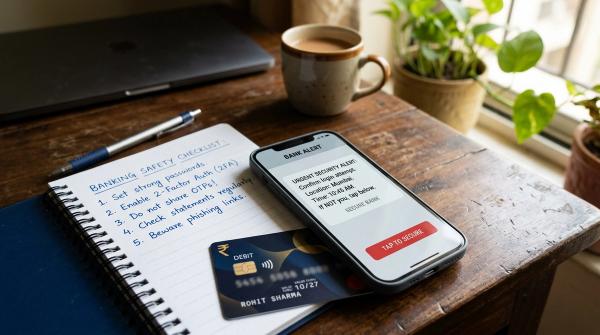
- Never share OTP, CVV, card PIN, UPI PIN or passwords.
- Read OTP messages before entering the OTP.
- Do not install screen-sharing apps for refunds or customer support.
- Review SMS, notification and accessibility permissions.
- Remove saved or tokenised cards from apps you no longer use.
- Keep bank apps, payment apps and shopping apps updated.
- Use only official bank channels for urgent issues.
Good payment safety is boring, but it works.
Sources checked
#This guide was reviewed against RBI’s card tokenisation FAQ, RBI card-on-file tokenisation notifications, and RBI digital payment authentication directions. Bank-specific screens, card controls and token removal steps can vary, so readers should rely on their bank’s official app or website for exact instructions.