Your bags are packed. Passport is ready. Visa is sorted. Tickets are saved on your phone. The airline finally opens online check-in.
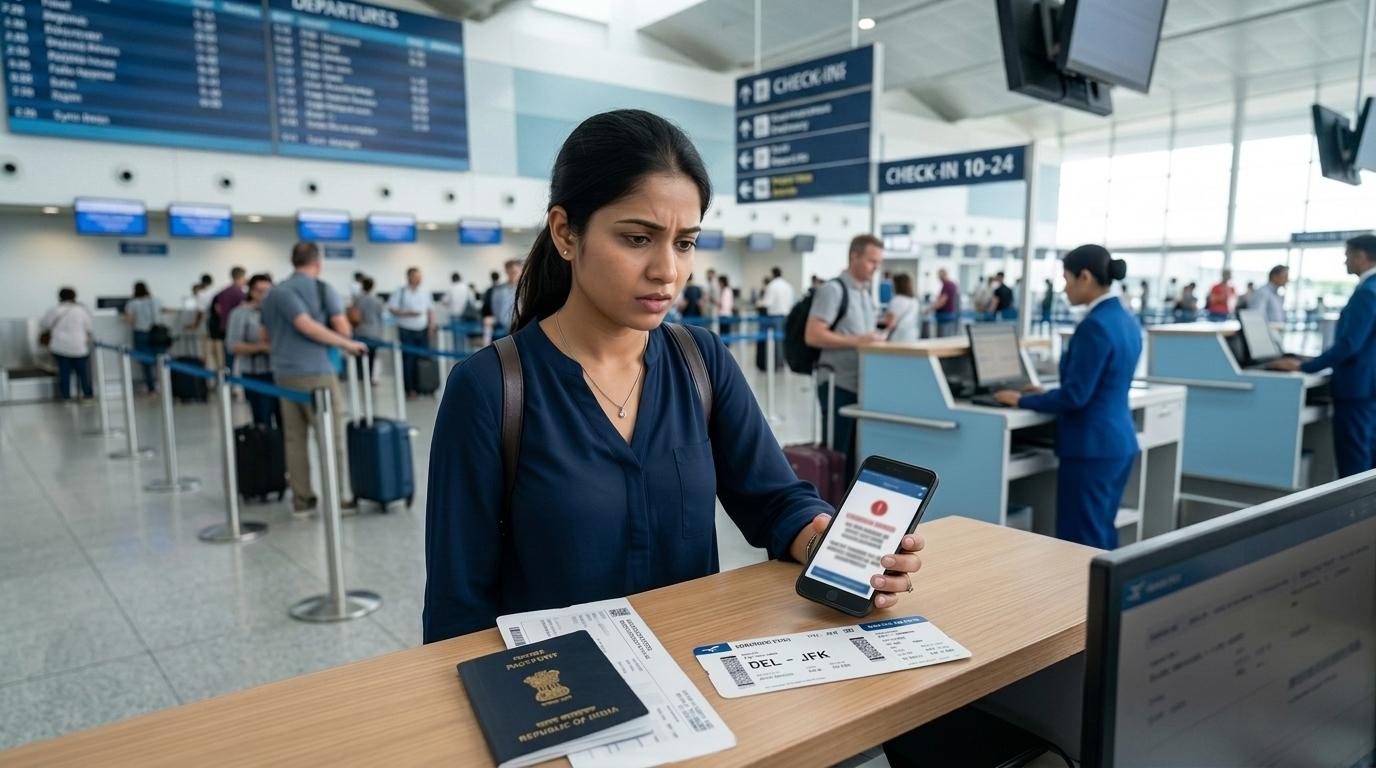
You enter your details, click submit, and then nothing happens.
No boarding pass.
Maybe the screen says:
- “Document verification required”
- “Please proceed to airport counter”
- “Boarding pass cannot be issued online”
- “Unable to verify travel documents”
- Or the page just keeps loading and failing
If your international flight online check-in is not working just a few hours before departure, it can feel genuinely stressful. And if this is your first international trip from India, the first thought is usually: Will they stop me from travelling?
The good news: in many cases, no.
A failed online check-in does not automatically mean your ticket is cancelled, your visa is invalid, or you cannot fly. Very often, it simply means the airline system could not verify something online. A staff member at the airport counter may need to check your passport, visa, name, transit rules, payment status, or booking manually.
This guide explains why international web check-in fails, what you should check first, when to call the airline, what documents to carry, and how to avoid last-minute panic at the airport.
If your problem is for an India domestic flight, read our separate guide on domestic flight web check-in problems in India. International flights are different because passport, visa, transit, and entry rules are involved.
Why International Online Check-In Fails
#International check-in is stricter than domestic check-in.
For domestic flights, check-in problems are often because of seat selection, payment status, airline app errors, or booking sync issues.
For international flights, airlines also need to check whether you appear eligible to travel to the destination country. If a passenger arrives abroad without the correct documents, they may be denied entry. The airline may then have to bring the passenger back and may even face penalties.
So airline systems are cautious. Sometimes, very cautious.
That is why online check-in may fail even when your ticket is confirmed and your documents are valid.
Here are the most common reasons.
1. You Are Checking In With the Booking Airline, Not the Operating Airline
#This is very common with codeshare flights.
You may have booked your ticket through one airline, but the actual aircraft may be operated by another airline. The plane, crew, airport counter, and check-in system may all belong to the operating airline.
For example, your ticket may show one airline’s flight number, but in the details it may say “operated by” another airline.
In that case, online check-in may work only on the operating airline’s website or app.
What to check
#- Look for “operated by” on your ticket or itinerary.
- Try checking in on the operating airline’s website or app.
- Use the operating airline’s PNR if a separate one is shown.
- Check whether your ticket has more than one booking reference.
If you are confused, call the airline or travel agent and ask: “Which airline will check me in at the airport?”
That one question can save you a lot of time.
2. Passport or APIS Details Are Wrong or Incomplete
#APIS stands for Advance Passenger Information System. For international travel, airlines collect passport and identity details and share required passenger information with authorities, depending on the country and route.
Even a small typo can create a passport details check-in problem.
Common mistakes include:
- One wrong digit in the passport number
- Date of birth entered in the wrong format
- Passport expiry date typed incorrectly
- Wrong nationality selected
- Wrong issuing country selected
- Name entered in a different order from the passport
- Old passport details saved in the airline profile
The frustrating part is that airline websites often do not tell you exactly what is wrong. They may simply say “check-in failed” or “document verification required.”
So you need to check each detail carefully.
3. Visa or Entry Permission Needs Manual Checking
#This is one of the biggest reasons Indian travelers cannot complete international online check-in.
Even if your visa is valid, the airline system may not be able to verify it automatically.
This can happen with:
- eVisas
- Visa-on-arrival eligibility
- Transit visa requirements
- Separate return or onward tickets
- Visas linked to an old passport
- Special entry permissions
- Routes with complicated transit rules
In these cases, the airline may want a counter staff member to physically check your documents before issuing the boarding pass.
It does not always mean something is wrong. It may simply mean the system wants a human to confirm it.
5. The Airline Wants Airport Counter Verification
#Sometimes nothing is actually wrong.
The airline may simply require in-person verification for your route, visa type, passport details, transit airport, booking type, or passenger profile.
Messages like these usually mean you need to go to the airport counter:
- “Proceed to airport counter”
- “Document verification required”
- “Boarding pass cannot be issued online”
- “Check-in completed, collect boarding pass at airport”
- “Unable to verify travel documents”
It is annoying, especially when you wanted to save time. But it is also quite common for international flights.
6. Security, Payment, or Seat Issues Need Staff Handling
#Online check-in may also fail if the airline needs to manually handle something unrelated to your visa or passport.
This can include:
- Seat allocation issues
- Additional security checks
- Payment verification
- Cardholder verification
- Booking restrictions
- Special service requests
- Ticketing or fare conditions
Some airlines may ask for card verification in certain bookings, especially when the cardholder is not travelling. Some passengers may also be selected for extra security checks.
In such cases, the system may stop the digital boarding pass and ask you to visit the airport counter.
Rules vary by airline, route, booking channel, and country. So if the message is unclear, it is better to call the airline instead of guessing.
Passport and APIS Details to Check First
#When international check-in fails, start with your passport.
Keep the physical passport next to you and compare every detail slowly. Do not rely on memory. Do not rely only on an old photo in WhatsApp unless you have no other option.
One digit, one letter, or one wrong date format can stop online check-in.
Check Your Passport Number
#Indian passport numbers usually start with a letter followed by numbers.
Make sure:
- The first letter is correct.
- You have not confused “O” with “0.”
- You have not missed any digit.
- The passport number in the airline system matches the passport you will carry.
If you renewed your passport after booking the ticket, your booking may still have the old passport number. Update it online if the airline allows it. If not, call the airline.
If your visa is linked to your old passport, check the destination country’s rules. In many cases, travelers carry both old and new passports when a valid visa is in the old passport, but this depends on the country and visa type.
For passport validity planning, read our related guide on passport renewal before international travel.
Check Your Date of Birth
#Date format mistakes are extremely common.
Some airline systems use DD/MM/YYYY. Others use MM/DD/YYYY. So a date like 05/07 can mean 5 July or 7 May, depending on the format.
Check:
- Day
- Month
- Year
- Whether the website auto-filled the date wrongly
- Whether your travel agent entered it correctly
If your date of birth is wrong in the booking, call the airline. Do not keep trying check-in again and again without fixing it.
Check Passport Expiry and Validity Rules
#Many countries require your passport to be valid for a minimum period beyond your travel date. Often, this means several months beyond arrival or departure.
The exact rule depends on:
- Destination country
- Transit country
- Visa type
- Nationality
- Return or onward travel date
If your passport is close to expiry, the airline system may block online check-in or ask for manual verification.
Check:
- Passport expiry date
- Destination entry rule
- Transit country rule
- Visa condition, if any
- Return or onward travel date
Do not assume, “My passport is valid on the day I travel, so it is fine.”
For international travel, that is not always enough.
Check Nationality and Issuing Country
#For Indian passport holders, nationality and issuing country should normally match your passport details.
A wrong drop-down selection can trigger errors.
Make sure the airline system has not selected:
- A different nationality
- A wrong issuing country
- Residency country instead of nationality
- Old passport details from your frequent flyer profile
Frequent flyer profiles sometimes auto-fill old data, so check those too.
Visa or Entry-Document Verification
#A “document verification required” message sounds scary, but many times it simply means the airline needs to check your visa or entry eligibility manually.
This is a common visa document verification airline issue, especially when rules depend on passport nationality, visa type, transit airport, return ticket, or eVisa approval.
eVisas May Not Verify Automatically
#Many Indian travelers use eVisas now. They are convenient, but airline systems do not always verify them smoothly.
Possible reasons include:
- The eVisa is linked to a different passport number.
- The visa is valid, but the airline system cannot confirm it online.
- The visa PDF needs human review.
- The airline must check validity, entry type, or travel dates at the counter.
- The destination country requires extra proof, such as return or onward travel.
If your eVisa is valid but online check-in fails, carry a printed copy of the approval. Also keep a digital copy on your phone, but do not depend only on phone battery or mobile data.
Transit Visa Rules Can Also Block Check-In
#Many travelers check the final destination visa but forget about the transit airport.
Depending on your route, passport, airport change, terminal change, layover time, or baggage situation, transit visa rules may apply.
The airline may block online check-in if it cannot confirm your transit eligibility.
Check:
- Whether you need to pass immigration during transit
- Whether your flights are on one ticket or separate tickets
- Whether baggage is checked through
- Whether the transit country requires a visa for your situation
- Whether your onward flight is confirmed
Transit rules can be confusing. Always verify with the airline and official government sources before travel.
Return or Onward Ticket Proof May Be Needed
#Some countries want proof that you will leave within the allowed stay. This may be a return ticket or onward ticket.
Online systems may not detect this if:
- Your return ticket is on another airline
- Your onward ticket is on a separate booking
- You booked through a different travel agent
- Your itinerary is complicated
In such cases, airport staff may need to see proof manually.
Carry printed copies of:
- Return ticket
- Onward ticket
- Full itinerary
- Hotel or accommodation booking, if relevant
- Visa approval or entry authorization
Visa Details Must Match Passport Details
#Check your visa or entry document for:
- Name spelling
- Passport number
- Date of birth
- Visa validity dates
- Number of entries
- Permitted stay
- Destination or issuing country conditions
If the visa itself has an error, contact the visa issuer or official source as early as possible. The airline usually cannot fix a visa mistake at the airport.
What to Check in the First 10 Minutes
#When online check-in fails, do not panic-click the same button 20 times. It usually does not help.
Instead, slow down and use this checklist.
Step 1: Read the Exact Error Message
#Take a screenshot.
Note whether it says:
- Document verification required
- Contact airline
- Proceed to airport counter
- Passport details invalid
- Visa verification failed
- Check-in unavailable
- Booking not found
This screenshot will help if you need to call the airline or speak to staff at the airport.
Step 2: Confirm the Check-In Window
#International check-in timings vary by airline and route.
If you are too early, check-in may not be open yet. If you are too late, online check-in may have already closed.
Check the airline’s official check-in timing for your exact flight.
Step 3: Check the Operating Airline
#If your ticket is a codeshare, try the operating airline’s website or app.
Also check whether a separate PNR is mentioned for the partner airline.
Step 4: Try a Browser or App Switch
#If the error looks technical, try:
- Airline app
- Airline website
- Different browser
- Incognito or private window
- Laptop instead of phone
- Stable internet connection
But do not randomly keep changing passport or visa fields. That can create more confusion.
Step 6: Call the Airline if Something Looks Wrong
#If the issue is about name, passport number, visa status, old passport, transit rules, payment verification, or booking ownership, call the airline instead of guessing.
When to Call the Airline
#Call the airline as soon as possible if:
- Your ticket name does not match your passport.
- Your passport number or date of birth is wrong in the booking.
- Your visa is linked to an old passport.
- The website says document verification failed.
- You are not sure which airline operates the flight.
- Your booking cannot be found.
- You booked with one airline but another airline operates the flight.
- You have separate tickets for onward travel.
- You are transiting through a country with unclear rules.
- You used a cardholder who is not travelling and the airline asks for verification.
Keep these ready when you call:
- PNR or booking reference
- E-ticket number
- Passport
- Visa or eVisa approval
- Flight date and route
- Screenshot of the error
- Travel agent details, if you booked through an agent
Ask clear questions like:
- “Is my booking confirmed?”
- “Which airline should I check in with?”
- “Are my passport details correct in the booking?”
- “Do I need document verification at the airport?”
- “Can my name be corrected or noted in the PNR?”
- “What documents should I bring to the airport counter?”
Do not rely only on random social media answers. Your airline, route, ticket, visa, and passport details matter.
What to Do at the Airport
#If online check-in still does not work, go to the airport early and use the airline counter.
For international flights, extra time really helps because document checks can take longer.
A failed online check-in usually means you need manual processing. It does not automatically mean your trip is blocked.
Arrive Early
#For international flights, reach the airport well before departure.
Many travelers aim for 3 to 4 hours before the flight, especially if:
- Document verification is needed
- The itinerary is complicated
- There is a transit visa question
- It is a codeshare flight
- It is your first international trip
- You have an old passport with a valid visa
Airline counter closing times vary, so check the rule for your airline, airport, and route.
Carry Printed Documents
#Carry hard copies, not just screenshots.
Bring:
- Passport
- Old passport, if it has a valid visa or relevant travel history
- Visa sticker, eVisa approval, or entry authorization
- Flight itinerary and e-ticket number
- Return or onward ticket
- Hotel or accommodation booking, if relevant
- Travel insurance document, if required
- Any airline confirmation about name correction or document verification
Printed copies help when counters are crowded, mobile data is weak, or staff need to check things quickly.
Go to the Correct Airline Counter
#For codeshare flights, go to the operating airline’s counter unless the airport display says something else.
Check:
- Departure board
- Airline counter zone
- “Operated by” details
- Airport staff guidance
If you are unsure, ask airport staff before joining a long queue.
Use Kiosks Only if It Makes Sense
#Some airports have self-service kiosks. You can try scanning your passport if the airline allows it.
But if the kiosk says “See Agent,” do not waste time trying repeatedly. Join the airline counter queue.
A passport scan may help sometimes, but visa and document checks often still need staff approval.
Stay Calm and Be Specific
#At the counter, keep it simple.
You can say:
Online check-in did not issue my boarding pass. It asked for document verification. Here are my passport, visa, and return ticket.
Avoid arguing about the website message. The counter agent needs to verify your booking and documents in the airline system.
If there is a problem, ask politely:
- “What exactly needs correction?”
- “Can the ticketing desk help?”
- “Can a supervisor check this?”
- “Is there any document missing?”
Being calm and specific usually works better than panicking.
How to Prevent This Before Your Next International Trip
#You cannot prevent every airline system error. But you can reduce the risk a lot.
Before Booking
#- Book using the exact passport name.
- Avoid nicknames and initials unless they are printed that way in the passport.
- Check passport validity before paying for non-refundable tickets.
- Confirm visa and transit rules from official sources.
- Be careful with separate tickets and self-transfer routes.
After Booking
#- Open “Manage Booking” and check passenger details.
- Add passport information if the airline allows it.
- Confirm meal, baggage, and seat requests separately from document details.
- Check whether your flight is operated by another airline.
- Save both the booking airline PNR and operating airline PNR, if shown.
Before Applying for a Visa
#- Use the same passport you will travel with.
- Check if your passport will remain valid long enough.
- Make sure your name matches your passport.
- Review visa validity dates and number of entries.
- Check whether the visa is linked to the correct passport number.
A Few Days Before Travel
#- Print your visa and itinerary.
- Check transit requirements again.
- Confirm return or onward tickets.
- Save offline copies of documents on your phone.
- Keep your old passport ready if your visa is in it.
- Check the airline’s online check-in opening time.
During Online Check-In
#- Enter passport details slowly.
- Watch date formats carefully.
- Do not guess visa fields.
- Take screenshots of errors.
- Call the airline if the message is unclear.
The goal is simple: reach the airport with enough time and enough proof, so the airline can make a clear decision.
Final Word
#International online check-in problems are stressful, especially when your flight is close. But they are also common.
If your booking is confirmed, your documents are valid, and your name matches your passport, the issue may simply need a human check at the airport counter.
Still, take every error seriously. Passport, visa, transit, and airline rules vary by country, route, and carrier.
Check your details carefully, call the airline when needed, carry printed documents, and reach the airport early. That gives you the best chance of fixing the issue calmly and getting your boarding pass without last-minute chaos.