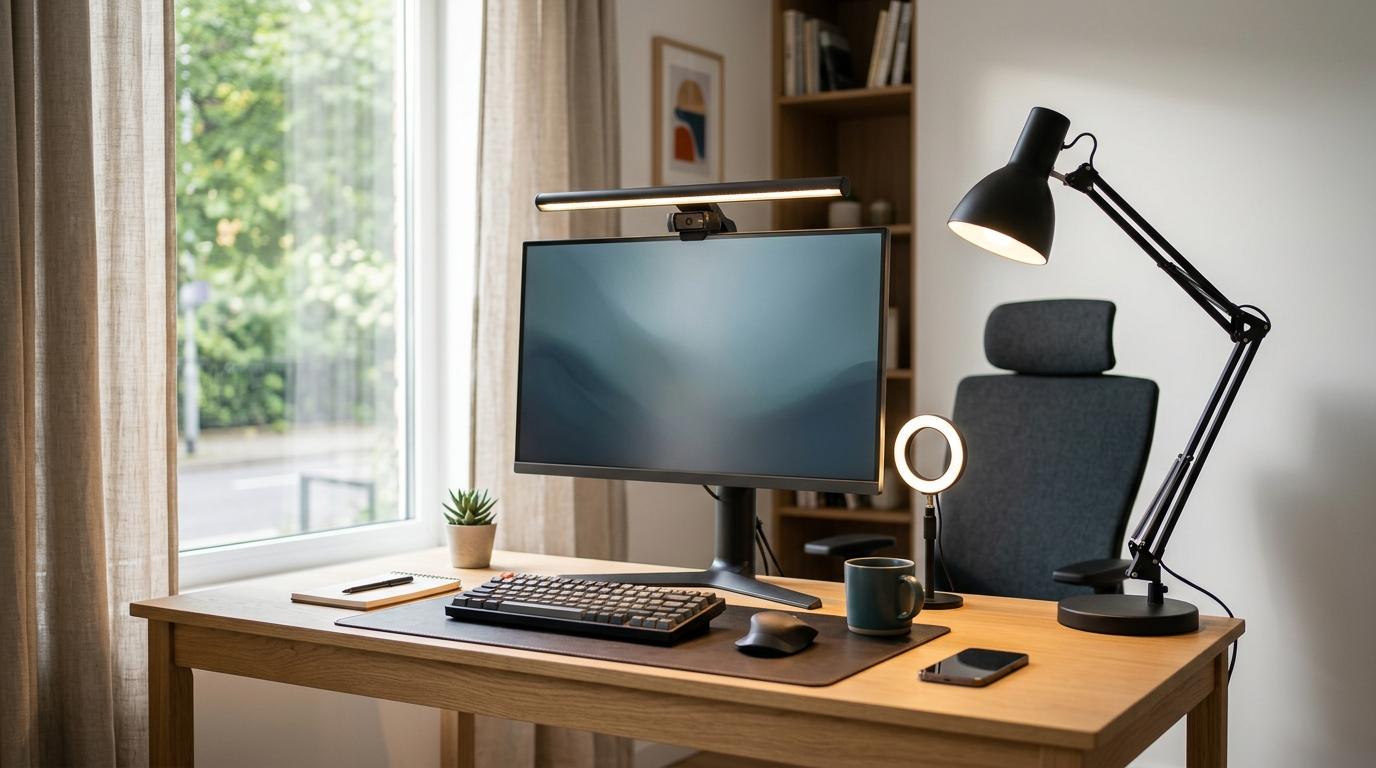
If you spend most of your day working at a monitor, a monitor light bar is probably the smartest pick. If you read, write, study, sketch, or deal with paperwork, you’ll likely get more use from a desk lamp. And if your biggest issue is looking tired, shadowy, or slightly haunted on video calls, get a ring light.
That’s the short version of the desk lamp vs monitor light bar vs ring light decision.
The real answer comes down to one simple question:
What are you actually trying to light?
Your desk? Your screen area? Or your face?
Quick Summary
#- Monitor light bar: Buy it if you mostly work at a monitor and want to save desk space. Skip it if you only use a laptop or need a light you can move around.
- Desk lamp: Buy it if you read, write, study, draw, or work with papers. Skip it if your desk is tiny or you only need light near your screen.
- Ring light: Buy it if you do lots of video calls, streaming, teaching, or content work. Skip it if you need useful light for your keyboard, notebook, or desk.
Who This Guide Is For
#This guide is for anyone trying to make a home office, dorm desk, small apartment setup, or work-from-home corner feel a little more usable.
Maybe your desk feels cramped. Maybe your eyes feel tired by mid-afternoon. Maybe your video calls make you look like you’re working from a basement, even when you’re not.
Whatever the issue, the goal here is simple: help you buy the right light without ending up with another gadget you barely use.
This is especially useful if you’re comparing:
- Monitor light bar vs desk lamp for computer work
- Desk lamp vs ring light for studying and video calls
- The best lighting for video calls without building a full mini studio
The Simple Buying Logic
#Before comparing features, ask yourself this:
What needs more light?
- Your keyboard and desk area near your monitor: get a monitor light bar
- Your books, papers, notes, and general workspace: get a desk lamp
- Your face on camera: get a ring light
It sounds obvious, but this is where people often buy the wrong thing.
A ring light can make you look better on Zoom, but it won’t help much when you’re trying to read notes. A desk lamp can light your workspace, but if you place it badly, it can reflect off your monitor. A monitor light bar is great for a clean computer setup, but it’s not meant to light your face.
1. Monitor Light Bar
#A monitor light bar is a slim LED light that sits on top of your monitor and shines downward onto your desk.
Good ones use angled or asymmetric lighting, which means the light is aimed at your desk instead of straight into your screen. That’s the main reason people choose them over regular desk lamps for computer work.
Best for
#- Writers, coders, analysts, gamers, and screen-focused workers
- Small desks where every inch matters
- People who want light on their keyboard without adding a lamp base
- Setups where a normal desk lamp causes screen glare
- Clean, minimal-looking workstations
Avoid if
#- You only use a laptop
- Your monitor is very thick, very curved, or unusually shaped
- Your webcam already sits on top of your monitor
- You need a light you can move around the room
Why it works well
#A monitor light bar saves desk space, which matters more than people realize. If your desk is already holding a keyboard, mouse, notebook, coffee mug, and random cables, not adding a lamp base is a big win.
It also puts light exactly where many computer users need it: on the keyboard and the area right in front of the monitor.
It’s especially useful if your desk is against a wall, your room lighting is weak, or you work at night and don’t want to light up the whole room.
The trade-off
#A monitor light bar won’t do much for video calls. Since the light points downward, your face can still look dark or uneven on camera.
So if your main goal is to look better on calls, this probably shouldn’t be your first choice.
2. Traditional Desk Lamp
#A desk lamp is still the most flexible option. It can light books, notebooks, paperwork, drawing pads, craft projects, and just about anything else happening on your desk.
It can also make your workspace feel warmer and more comfortable, depending on the bulb or brightness setting. The downside is that it takes up more space and needs better placement than a monitor light bar.
Best for
#- Students reading textbooks or writing notes
- People who work with printed documents
- Artists, designers, crafters, and hobbyists
- Anyone who uses the same desk for different types of work
- People who don’t want to attach anything to their monitor
Avoid if
#- Your desk is already cramped
- Your monitor catches reflections easily
- You only do computer work and want a cleaner setup
- You don’t have room for a lamp base or clamp
Why it works well
#The biggest advantage of a desk lamp is flexibility.
You can move it. Angle it. Use it away from the computer. Point it at a book, notebook, keyboard, sketchpad, or stack of papers. That makes it the safest all-around choice for mixed work.
In the monitor light bar vs desk lamp comparison, the desk lamp wins when your day isn’t just screen work. If you switch between typing, reading, writing, and sorting papers, a regular lamp usually makes more sense.
The trade-off
#A desk lamp can cause glare if it points at your monitor or reflects off the screen. Placement matters a lot.
Most of the time, it works better to place the lamp off to the side and aim it downward instead of pointing it toward the display.
3. Ring Light
#A ring light is a circular LED light that usually sits near your webcam, phone, or camera. Its main job is to light your face, not your desk.
That makes it a good choice for video calls, online teaching, streaming, interviews, client meetings, and content creation.
Best for
#- Frequent video calls
- Online teachers and coaches
- Creators, streamers, and freelancers
- Sales calls, interviews, and client-facing work
- Anyone who wants more even face lighting on camera
Avoid if
#- You need task lighting for reading or writing
- You’re sensitive to bright light shining toward your eyes
- You want one light to improve your whole desk setup
- You don’t want extra gear around your monitor or camera
Why it works well
#For the best lighting for video calls, front-facing light matters more than desk lighting.
A ring light puts light directly on your face, which helps reduce harsh shadows and makes your camera image look cleaner. It’s also easy to use: place it near the camera, adjust the brightness, and you’ll usually look better right away.
The trade-off
#A ring light is not a great work light.
It won’t brighten your keyboard, notebook, or papers in a very useful way. And if you’re working for hours, having a bright light facing you can get annoying, especially if your eyes are sensitive.
Comparison: How the Three Options Differ
#- Main purpose: A monitor light bar lights the keyboard and desk area for screen work. A desk lamp lights your physical workspace. A ring light lights your face for camera use.
- Best use case: Choose a monitor light bar for computer work, a desk lamp for reading or writing, and a ring light for video calls or content creation.
- Desk space: A monitor light bar usually needs the least desk space. A desk lamp needs room for a base or clamp. A ring light may need a tripod, clamp, or camera mount.
- Screen glare: A monitor light bar can reduce glare when designed and positioned well. A desk lamp can create glare if aimed badly. A ring light usually affects your face more than the screen.
- Video calls: A ring light is the strongest choice for calls. A desk lamp can help if placed well. A monitor light bar is limited because it points downward.
- Flexibility: A desk lamp is the most flexible. A monitor light bar is best for a fixed monitor setup. A ring light is specialized for camera-facing work.
What to Check Before Buying
#1. Your main task
#Don’t start with the product. Start with the problem.
If you mostly type, read from a screen, and want less clutter, a monitor light bar makes sense. If you study with books or write in notebooks, a desk lamp is the safer choice. If you’re on camera every day, a ring light will probably make the biggest difference.
2. Monitor shape and thickness
#If you’re buying a monitor light bar, make sure it actually fits your monitor.
Some clips don’t work well with thick monitor backs, aggressive curves, or unusual designs. Also check that the front lip rests on the bezel, not on the active screen area.
3. Webcam placement
#This is easy to forget.
A monitor light bar often sits exactly where your webcam would normally go. If you use a webcam often, look for a light bar with a flat top, a webcam-friendly design, or enough room for a separate webcam mount.
Otherwise, you may end up with a nice light and nowhere good to put your camera.
4. Desk space
#For small apartments, dorm rooms, and compact home offices, desk space matters.
A lamp base, tripod, or bulky clamp can make a small desk feel crowded fast. If your desk is already full, a monitor light bar may be the cleanest option. A compact clamp lamp can also work, as long as your desk edge can support it.
5. Brightness and adjustability
#Look for adjustable brightness.
Color temperature control is also useful, especially if you like cooler light for focus during the day and warmer light in the evening.
Avoid lights with only one setting if you can. One brightness level is rarely right for morning, afternoon, and night.
6. Power source and cable setup
#Many monitor light bars and ring lights use USB power. That can be neat, but only if you have a free USB port nearby.
Desk lamps may use USB or wall power, depending on the model. Before buying, think about where the cable will go, especially if your desk is against a wall or you hate visible cords.
Common Mistakes to Avoid
#Mistake 1: Buying one light for the wrong job
#A ring light is not a desk lamp. A desk lamp is not always good camera lighting. A monitor light bar is not designed to brighten your face.
Buy for your main use, not for the product that looks coolest online.
Mistake 2: Ignoring glare
#If you use a desk lamp near a monitor, pay attention to the angle.
Light pointed toward the screen can bounce back into your eyes or wash out part of the display. Put the lamp to the side, aim it downward, or bounce the light softly off a nearby wall if that works in your room.
Mistake 3: Forgetting your webcam
#A monitor light bar can get in the way of your webcam.
It’s one of those small setup problems people often notice too late. If video calls matter, plan where both the light bar and webcam will sit before you buy.
Mistake 4: Choosing brightness over control
#A super bright light is not automatically better.
For daily work, control matters more than raw brightness. Adjustable brightness lets you match the light to morning, afternoon, and evening use. Your eyes will probably appreciate it.
Mistake 5: Overcomplicating a small desk
#Small desks usually work best with fewer objects.
If you already have a laptop stand, keyboard, mouse, notebook, water bottle, and coffee mug on the desk, adding a large lamp or tripod may just make the setup more annoying.
In that case, a monitor light bar or small clamp lamp is usually more practical.
Final Recommendation
#Choose a monitor light bar if your work is mostly computer-based and you want a clean, space-saving setup.
Choose a desk lamp if your day includes reading, writing, studying, drawing, or handling physical documents.
Choose a ring light if your biggest problem is how you look on video calls.
If you can only buy one, choose based on what you do most often. For many home office workers, that means a monitor light bar for screen work or a desk lamp for mixed work. For creators, teachers, and people on calls all day, a ring light may be the smarter first buy.