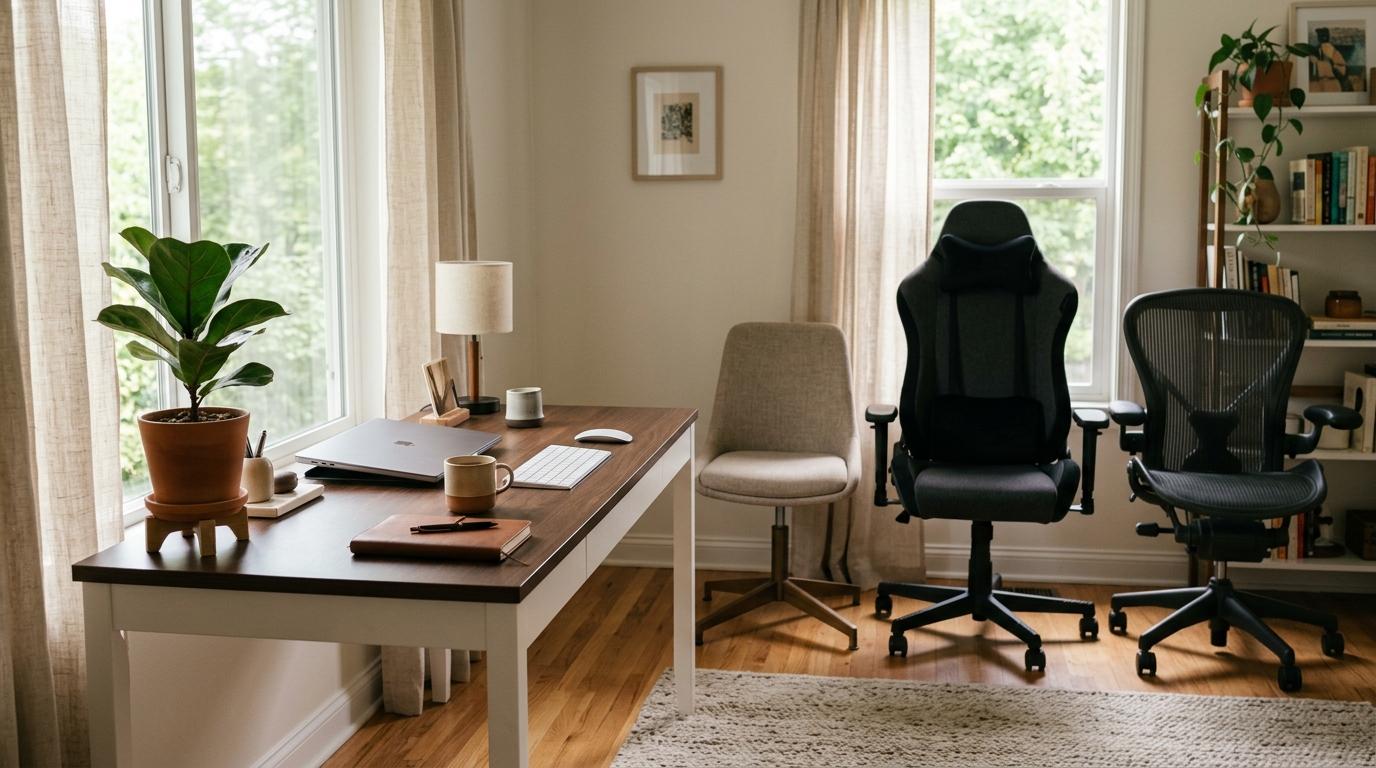
If you spend a lot of time at a desk, the safest choice is usually an ergonomic chair.
Not always. Not for everyone. But for most people who work from home, study, write, code, edit, take calls, or sit at a computer for hours, a properly adjustable ergonomic chair makes the most sense.
Gaming chairs can look great and feel fun, especially if you like a bold setup or enjoy reclining. Standard office chairs can also be perfectly fine for short sessions or occasional use. But when the question is long-term desk comfort, adjustability usually matters more than style or extra padding.
Short Answer: Office Chair vs Gaming Chair vs Ergonomic Chair
#- Standard office chair: Best for light desk use, shared desks and tight budgets. Avoid if you sit for long hours or need better support.
- Gaming chair: Best for gaming setups, bold style and casual use. Avoid if you want the best chair for full workdays.
- Ergonomic chair: Best for work from home, studying and long desk sessions. Avoid if you only sit occasionally or cannot check sizing/returns.
Quick verdict: In the office chair vs gaming chair debate, gaming chairs usually win on looks. Ergonomic chairs usually win on practical desk comfort because they give you more ways to adjust the seat, back, lumbar support, and armrests to fit your body.
Why Your Chair Choice Matters
#A chair seems like a simple thing. You sit down, you get to work, and that’s it.
But if you use your desk every day, your chair affects more than you might think. It changes how close you sit to your keyboard, whether your shoulders stay relaxed, whether your feet rest properly, and whether your lower back feels supported. It can also be the reason you keep shifting around every ten minutes without really knowing why.
That does not mean you need to buy the most expensive chair you can find. It just means you should buy the right chair for how you actually use your desk.
If you only sit for an hour here and there, almost any decent chair can do the job. But if your desk is where you work, study, game, take calls, write, design, edit, or use a laptop for hours at a time, the chair becomes part of your daily setup.
And then it starts to matter a lot more.
1. Standard Office Chair
#A standard office chair is the basic desk chair most people are familiar with. It usually has a padded seat, a simple backrest, height adjustment, and sometimes fixed armrests.
It is not automatically a bad choice. It is just a simple one.
Who Should Buy a Standard Office Chair?
#A standard office chair can make sense if:
- You only sit at your desk for short periods.
- The chair is for a guest room or shared family computer.
- You need something simple and affordable.
- You are not working full days from that chair.
- You do not care much about extra adjustments.
For light use, a basic office chair can be completely fine. It gives you a proper seat at your desk without making you pay for features you may not need.
Who Should Avoid a Standard Office Chair?
#You may want to avoid a standard office chair if:
- You work from home for long hours.
- You study for long sessions.
- You often feel stiff after sitting.
- The fixed arms stop you from getting close to your desk.
- The backrest does not support you well.
- More than one person will use the chair regularly.
The main downside is limited adjustment. If the chair does not fit your body or your desk, there may not be much you can change. That is when a “good enough” chair starts feeling frustrating.
2. Gaming Chair
#Gaming chairs are easy to recognize. They often have tall backs, bold colors, side bolsters, thick padding, deep recline, and removable head or lumbar pillows. Many of them are inspired by racing seats.
They can feel comfortable at first, especially if you like a cushioned, wrapped-in seat. They also look right at home in gaming rooms, streaming setups, and RGB-heavy desk spaces.
But for everyday desk work, they are not always the smartest buy.
Who Should Buy a Gaming Chair?
#A gaming chair can make sense if:
- You genuinely like the gaming style.
- Your desk is used mostly for gaming and casual use.
- You enjoy a high back and deep recline.
- You sit for shorter or mixed sessions.
- You want your chair to match the look of your setup.
A gaming chair is not a bad choice just because it is a gaming chair. If you like the look, use your desk casually, and find one that fits you well, it can work.
The key is being honest about how you will use it.
Who Should Avoid a Gaming Chair?
#You may want to avoid a gaming chair if:
- You sit at your desk most of the day.
- You need a practical chair for typing, laptop use, and calls.
- You dislike feeling boxed in by side bolsters.
- You need precise lower-back support.
- Your room gets warm and the chair uses heat-trapping material.
- You are buying it mostly because it looks comfortable in photos.
The common issue with gaming chairs is that many rely on removable pillows instead of built-in adjustable support. Some pillows are fine, but they do not always land in the right place for your body. The racing-style shape can also limit natural movement, which may become annoying during longer work sessions.
In the gaming chair vs ergonomic chair comparison, gaming chairs usually win on personality. Ergonomic chairs usually win on adjustability.
3. Ergonomic Chair
#An ergonomic chair is built around fit and support. The point is not simply to add more padding. The point is to help the chair match your body and your desk setup.
A good ergonomic chair usually lets you adjust more than just the height. Depending on the model, you may get adjustable lumbar support, seat depth, backrest tilt, tilt tension, armrest height, and sometimes armrest width or angle.
That matters because two people can be the same height and still need different chair settings.
Who Should Buy an Ergonomic Chair?
#An ergonomic chair is usually the best starting point if:
- You work at a desk daily.
- You study for long hours.
- You use a keyboard, mouse, monitor, or laptop setup often.
- You want a chair you can adjust to your body.
- You share the chair with someone else.
- You want comfort based on support and fit, not just softness.
For most home-office workers, students, freelancers, and full-time desk users, this is the chair category that makes the most sense.
Who Should Avoid an Ergonomic Chair?
#An ergonomic chair may not be necessary if:
- You only sit at your desk once in a while.
- You are buying mainly for looks.
- You do not want to spend time adjusting it.
- The chair says “ergonomic” but has very few useful adjustments.
- You cannot check the sizing or return policy.
One important thing to remember: “ergonomic” is not a magic word.
A cheap chair can have “ergonomic” in the title and still be uncomfortable, flimsy, or barely adjustable. Buy the actual features, not the label.
Office Chair vs Gaming Chair vs Ergonomic Chair: Full Comparison
#- Standard office chair: Simple and affordable; best for light desk use; limited support is the main weakness.
- Gaming chair: Style, recline and padded feel; best for gaming setups and casual sessions; can prioritize looks over fit.
- Ergonomic chair: Adjustability and fit; best for work, study and long desk use; may cost more and needs setup.
For daily desk work, compare back support, armrest adjustment, seat depth, material breathability and return policy before you compare colors.
The Real Difference: Looks, Padding, or Adjustability?
#A lot of people assume comfort means softness. That is why thick gaming chairs can look so tempting.
But desk comfort is not just about how a chair feels in the first five minutes. A chair can feel amazing when you first sit down and still feel wrong after three hours.
Long-session comfort usually depends on whether the chair helps you sit naturally at your desk.
A good desk chair should help you:
- Keep your feet flat or properly supported.
- Sit close enough to your desk without reaching.
- Keep your elbows relaxed while typing.
- Support your lower back without pushing you forward.
- Move a little instead of locking you into one position.
- Adjust the seat and arms so your shoulders are not constantly raised.
That is why ergonomic chairs usually make more sense for work. They may not be the flashiest chairs in the room, but they focus on the boring details that actually matter after a few hours.
What to Check Before Buying Any Desk Chair
#Before you buy, check these details carefully. This is where a good purchase usually happens.
1. Seat Height Range
#Your chair should let your feet rest flat on the floor, or on a footrest. If the chair is too high, your legs may dangle. If it is too low, your knees may sit too high and your desk position can feel awkward.
Also check your desk height. A good chair can still feel bad if it does not work with your desk.
2. Seat Depth
#Seat depth is easy to ignore, but it matters.
Ideally, you should be able to sit back in the chair with a small gap between the front edge of the seat and the back of your knees.
If the seat is too deep, you may slide forward. If it is too shallow, your thighs may not feel supported.
3. Lumbar Support
#Look closely at how the lower-back support works.
Ask yourself:
- Is it built into the chair?
- Can it move up or down?
- Can it become firmer or softer?
- Is it just a loose pillow?
A pillow is not always bad, but it is usually less precise than built-in adjustable support.
4. Armrest Adjustability
#Armrests should help your shoulders relax.
If they are too high, your shoulders may lift. If they are too low, they may not help much. If they are fixed and wide, they can stop you from getting close enough to your desk.
At minimum, height-adjustable arms are useful. More adjustment can help too, but only if the rest of the chair fits you well.
5. Backrest and Recline
#A good backrest should support you while still allowing some movement. Recline can be nice, but do not buy a chair only because it leans far back.
For work, controlled recline and proper back support matter more than dramatic reclining angles.
6. Material and Breathability
#Material makes a big difference in daily comfort.
- Mesh can feel cooler and more breathable.
- Fabric can feel softer, though it may be harder to clean.
- Synthetic leather can look sleek and wipe clean, but it may trap heat.
If your room gets warm or you sit for long hours, breathability should be a serious factor.
7. Chair Size and Weight Capacity
#Do not assume one chair fits everyone.
Check the recommended height range, seat width, seat depth, and weight capacity. A chair that fits one person perfectly can feel wrong for someone shorter, taller, broader, or lighter.
8. Return Policy
#This is practical but important.
A chair can look perfect online and still feel wrong after a few days. If possible, buy from a seller with a clear return policy or trial period.
Step-by-Step Chair Buying Checklist
#Use this quick checklist before you spend your money.
Step 1: Count Your Daily Sitting Time
#Be honest about how much you actually sit.
- Under 2 hours a day: A standard office chair may be enough.
- 2 to 5 hours a day: A better office chair or gaming chair can work, but check the support carefully.
- 5+ hours a day: Start with ergonomic chairs first.
The longer you sit, the more adjustability matters.
Step 2: Decide Your Main Use
#Ask what the chair is really for:
- Working from home?
- Studying?
- Gaming?
- Video calls?
- Laptop use?
- A shared family desk?
- Occasional browsing?
If the chair is mainly for work or study, do not let the gaming look make the decision for you.
Step 3: Measure Your Desk Setup
#Check whether the chair can fit under your desk. Fixed armrests often cause problems here.
Also think about your keyboard and mouse position. If the chair keeps you too far away, you may start leaning forward without noticing it.
Step 4: Shortlist by Adjustments, Not Looks
#For long desk comfort, look for:
- Seat height
- Seat depth
- Lumbar support
- Armrest height
- Backrest tilt
- Breathable material
- Proper chair size
Looks can be the tiebreaker. They should not be the starting point.
Step 5: Read the Sizing Details
#Do not buy from photos alone.
Check the real dimensions. Pay attention to seat width, seat depth, backrest height, and the recommended user range.
Step 6: Check Return and Warranty Terms
#A chair has to fit your body, not just your room.
A return policy lowers the risk of getting stuck with something that looks good but feels wrong.
Step 7: Test It Properly After Delivery
#When the chair arrives, adjust it before judging it.
Set the height, move the lumbar support if it has one, adjust the armrests, and try it with your actual desk, keyboard, mouse, laptop, or monitor setup.
Do not judge a chair based only on the first five minutes.
Common Mistakes to Avoid
#Mistake 1: Buying Only for the Look
#Gaming chairs are often more exciting to look at than office chairs. That does not mean they are better for desk work.
If you type, study, take calls, or work for hours, comfort should come before color and shape.
Mistake 2: Trusting the Word “Ergonomic” Too Quickly
#Lots of chairs use “ergonomic” in the product name. That does not guarantee good design.
Check what actually adjusts. If the chair only goes up and down, it may not be very ergonomic at all.
Mistake 3: Ignoring Your Desk Height
#A good chair can still feel bad with the wrong desk.
If the desk is too high, your shoulders may stay raised. If it is too low, your legs may feel cramped.
Chair buying should include the whole desk setup, not just the chair.
Mistake 4: Choosing Too Much Padding
#Thick padding can feel comfortable at first, but it is not the same as support.
Over time, soft padding can compress, and the chair may stop feeling balanced. Support and fit matter more than cushion thickness.
Mistake 5: Forgetting About Room Temperature
#If your room gets warm, material matters.
Non-breathable surfaces can feel sticky during long sessions. Mesh or breathable fabric may be better for daily work.
Mistake 6: Assuming Bigger Means Better
#A large chair may look premium, but that does not mean it will fit you.
If the seat is too deep or the armrests are too wide, the chair can force you into an awkward position. Buy for your body size, not for how impressive the chair looks in a product photo.
Mistake 7: Not Adjusting the Chair
#Many people buy an adjustable chair and never really adjust it.
Spend a few minutes setting it up. That is the whole reason you paid for those features.
Posture and Comfort Cautions
#This guide is for choosing a comfortable desk chair. It is not medical advice.
A better chair can help you sit in a more relaxed and supported way, but it will not fix every discomfort problem by itself. Long static sitting can still feel tiring, even in a good chair.
For better day-to-day comfort:
- Change position during the day.
- Stand up regularly.
- Keep your keyboard and mouse close.
- Avoid hunching over a laptop for long periods.
- Use a laptop stand or external keyboard if your setup makes you look down.
- Stop using any chair that causes unusual discomfort, and get professional advice if pain continues.
The best chair should support movement. It should not trap you in one “perfect” position all day.
So, What Should You Buy?
#Here is the simple version.
Choose a Standard Office Chair If...
#You need a basic seat for short, occasional desk use.
It is fine for a spare room, family computer, or light study corner. Just do not expect it to solve long workday comfort.
Choose a Gaming Chair If...
#You love the gaming look, want a high-back chair, enjoy reclining, and do not sit for full workdays.
A gaming chair can also make sense if your setup is mostly for gaming and casual use. Just be careful with heat, fixed shapes, and pillow-based support.
Choose an Ergonomic Chair If...
#You work, study, write, code, design, attend calls, or use your desk for long stretches.
For most people comparing office chair vs gaming chair options for real desk comfort, an ergonomic chair is the most practical choice.
Final Verdict
#For daily desk work, buy an ergonomic chair if your budget allows and the chair fits your body.
For occasional use, a standard office chair is usually enough.
For gaming-focused setups where style matters and sitting sessions are not too long, a gaming chair can still work.
The smartest purchase is not the most expensive chair or the most dramatic-looking one. It is the chair that fits your body, your desk, your sitting time, and your real routine.
In the office chair vs gaming chair choice, ask yourself one question first:
Am I buying this for looks, or for long desk comfort?
That answer usually makes the decision much easier.