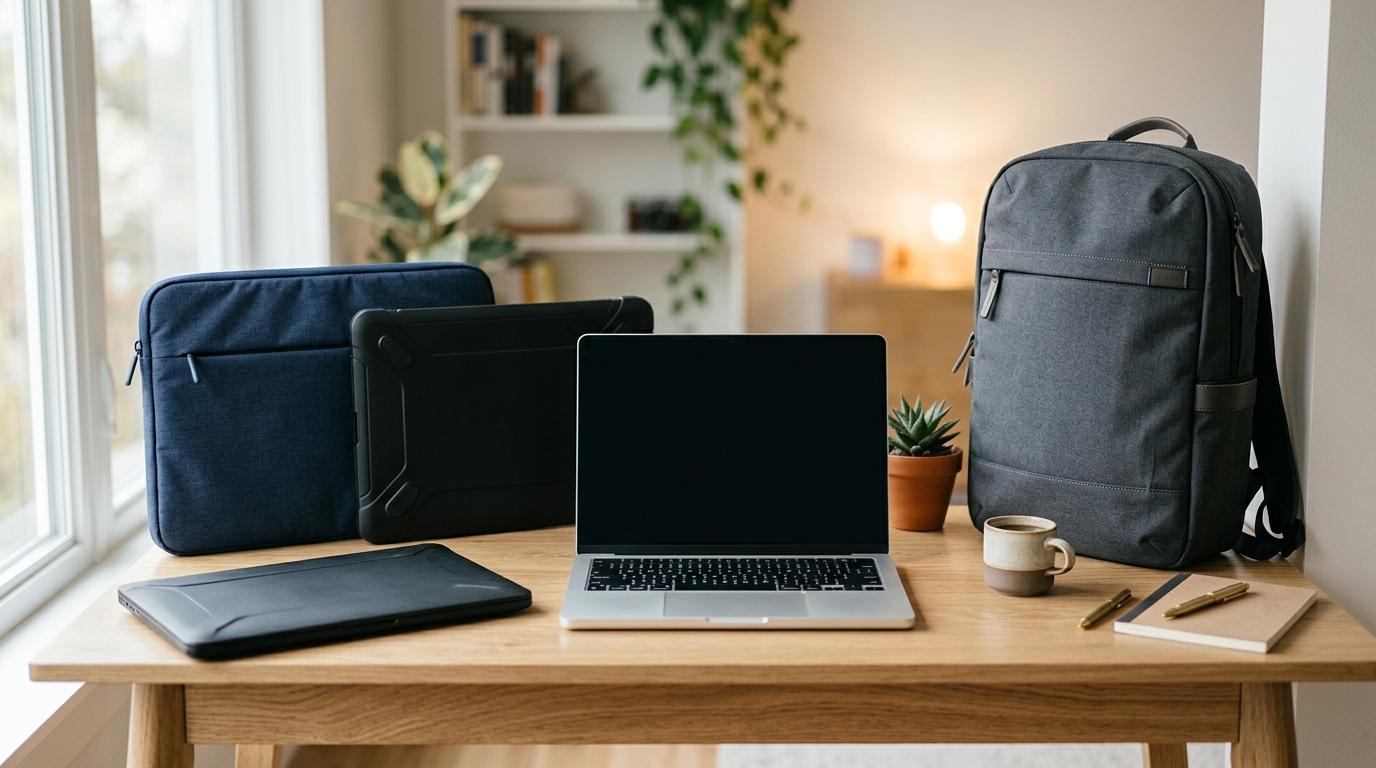
The best way to protect your laptop is not always the thickest case, the most expensive backpack, or the option that looks the most rugged. It is the option you will actually use every day. If you commute with a charger, mouse, notebook, water bottle, lunch, and daily extras, a laptop backpack is usually the most practical choice. If you already carry a tote, briefcase, messenger bag, or travel bag, a laptop sleeve may be enough. If scratches and desk scuffs are your main worry, a hard shell can help.
Quick Answer: Which One Should You Buy?
#Choose a laptop sleeve if you already use another bag and mainly need slim scratch protection.
Choose a hard shell laptop case if you want surface protection while using the laptop, or a firmer case while packing it inside another bag.
Choose a laptop backpack if you commute, carry accessories, or want one all-in-one daily setup.
Best quick fit:
- Already use a tote, briefcase, messenger bag, or travel bag: laptop sleeve.
- Mainly want to prevent scratches while using the laptop: clip-on hard shell case.
- Laptop gets packed with heavier items: firmer hard case or EVA-style case.
- Carry charger, mouse, notebook, bottle, and daily gear: laptop backpack.
- Backpack has weak laptop padding: backpack plus sleeve.
A student walking across campus, an office worker riding the metro, and a freelancer moving between cafés do not need the same kind of protection. One person may need a proper padded backpack. Another may just need a slim sleeve inside a bag they already love. Someone else may want a hard shell because their laptop gets dragged across desks all day.
Laptop Sleeve vs Hard Case vs Backpack: What’s the Difference?
#Before choosing one, it helps to understand what each product is designed to do.
A laptop sleeve is a slim padded pouch. It protects your laptop from scratches, light bumps, and friction while it sits inside another bag.
A hard shell laptop case usually means one of two things. It can be a clip-on plastic shell that stays on your laptop while you use it, or it can be a firmer standalone case that your laptop goes into when packed away.
A laptop backpack is a full carrying setup. It protects your laptop, but it also gives you space for your charger, cables, books, documents, lunch, water bottle, and all the other things that somehow end up in your bag.
None of these is automatically better than the others. They solve different problems.
1. Laptop Sleeve: Best for Slim, Simple Protection
#A laptop sleeve is the simplest option. It is usually made from neoprene, padded fabric, felt, leather, vegan leather, or another soft protective material.
Think of it as a protective layer for when your laptop is inside another bag.
It is not really meant to replace a backpack or briefcase. Its job is to stop your laptop from rubbing against keys, chargers, pens, zippers, notebooks, and other things floating around in your bag.
Who should buy a laptop sleeve?
#A laptop sleeve makes sense if:
- You already have a tote, briefcase, messenger bag, or travel bag.
- Your current bag does not have a padded laptop section.
- You want something slim and lightweight.
- You mostly travel between home, office, class, meetings, or cafés.
- You do not carry many laptop accessories.
- You want basic protection without buying a whole new bag.
A sleeve is also useful if you switch bags often. You can move the sleeve from one bag to another instead of buying multiple laptop bags.
Who should avoid a laptop sleeve?
#A sleeve alone may not be enough if:
- You carry a charger, mouse, headphones, notebook, hard drive, and other accessories.
- You walk long distances with your laptop.
- You use crowded buses, trains, or metro lines every day.
- Your laptop often sits under or beside heavier items.
- You need pockets, bottle storage, and better organization.
- You are a little rough with your bag, even unintentionally.
A sleeve is good for everyday scratches and small bumps. It is not serious drop protection on its own.
Best use case
#A laptop sleeve is best when you already own a good bag and just need a soft layer around your laptop.
If your daily carry is basically “laptop and maybe one notebook,” a sleeve can be enough. If your daily carry looks like a small mobile office, you will probably want something more practical.
2. Hard Shell Laptop Case: Best for Scratches, Scuffs, and Firmer Packing Protection
#The term “hard case” can be confusing because people use it for two different products.
Type 1: Clip-on hard shell case
#This is the plastic shell that snaps onto the top and bottom of your laptop. It stays attached while you work.
Its main job is to protect the laptop body from scratches, scuffs, and small dents. It can be useful if your laptop is always on rough desks, classroom benches, café tables, shared workspaces, or if you often carry it bare from room to room.
But be realistic: a clip-on hard shell does not make your laptop shockproof. It is not the same as a padded travel case.
Type 2: Semi-rigid hard case
#This is a firmer case that your laptop goes into when you are not using it. It usually has a harder outer layer and more structure than a soft sleeve.
Its main job is to protect your laptop while it is packed with other items, such as inside luggage, a gear bag, or a crowded work bag.
Who should buy a hard shell laptop case?
#Buy a clip-on hard shell case if:
- You often use your laptop on rough tables.
- You mainly worry about scratches and surface wear.
- You carry your laptop bare around your home, office, or classroom.
- You want the laptop body to stay cleaner-looking over time.
- You can find a shell made for your exact laptop model.
Buy a firmer standalone hard case if:
- You pack your laptop inside luggage.
- You need more structure than a soft sleeve.
- Your laptop may sit near heavier items.
- You want extra protection before placing it inside another bag.
Who should avoid a hard shell laptop case?
#Avoid a clip-on hard shell if:
- Your laptop already gets hot.
- The shell blocks vents or airflow.
- You do gaming, rendering, video editing, or other heavy work for long sessions.
- You cannot find an exact model fit.
- You want the lightest setup possible.
Clip-on shells can trap heat, especially if your laptop uses its metal body to help with cooling. They can also fit badly if they are not made for your exact model. Not just the same brand. Not just the same screen size. The exact model matters.
Best use case
#A hard shell laptop case is best when your main concern is surface damage or packing pressure.
It is not the most flexible everyday carry option, and it does not replace the storage, comfort, or organization of a good backpack.
3. Laptop Backpack: Best for Commuters and Daily Gear
#A laptop backpack is the most complete everyday option.
It gives you a dedicated laptop compartment, padding, storage, and hands-free carrying. For students, office workers, commuters, and hybrid workers, it is often the easiest and most practical answer.
The biggest benefit is not just protection. It is convenience.
Your laptop has a place. Your charger has a place. Your mouse, notebook, wallet, cables, bottle, lunch, and umbrella have a place too.
A sleeve or hard case cannot handle that kind of setup by itself.
Who should buy a laptop backpack?
#A laptop backpack makes sense if:
- You commute by bus, train, metro, bike, or on foot.
- You carry your laptop almost every day.
- You also carry a charger, mouse, notebook, headphones, or documents.
- You want both hands free.
- You want better weight distribution.
- You need one bag for work, college, travel, or hybrid routines.
For the best laptop protection for commuters, look for a backpack with a padded laptop compartment and a raised or suspended bottom. That small gap helps reduce impact when you put the bag down quickly.
Who should avoid a laptop backpack?
#A laptop backpack may be more than you need if:
- You only carry the laptop and nothing else.
- You already own a bag you enjoy using.
- You need a more formal look for meetings.
- You dislike bulky bags.
- You want the absolute lightest setup.
Backpacks are practical, but not everyone needs one.
Best use case
#A laptop backpack is best for people who carry a full daily setup.
If your laptop is just one part of your work or college kit, choose the backpack. If the laptop is the only thing you carry, a sleeve may feel simpler.
Side-by-Side Comparison
#Laptop sleeve
#- Best for: slim protection inside another bag.
- Main protection: scratches and light bumps.
- Works while laptop is in use: no.
- Accessory storage: usually none or very limited.
- Best user: minimalist, office worker, light commuter.
- Heat concern: no.
- Fit sensitivity: needs correct size.
- Biggest downside: limited drop and accessory protection.
Hard shell laptop case
#- Best for: scratch protection or firmer packing protection.
- Main protection: scuffs, surface wear, and added structure depending on type.
- Works while laptop is in use: clip-on shell, yes.
- Accessory storage: usually none.
- Best user: someone worried about scratches or packing pressure.
- Heat concern: possible with clip-on shells.
- Fit sensitivity: needs exact model fit, especially clip-on shells.
- Biggest downside: can add bulk and may affect cooling.
Laptop backpack
#- Best for: full everyday carry.
- Main protection: transit protection, storage, and organization.
- Works while laptop is in use: no.
- Accessory storage: good to excellent.
- Best user: student, commuter, office worker, remote worker.
- Heat concern: no.
- Fit sensitivity: needs correct laptop compartment size.
- Biggest downside: bulkier than a sleeve or shell.
What to Check Before Buying
#A product can look perfect online and still be wrong for your laptop or routine. Before buying, check these things.
1. Check the exact laptop dimensions
#Do not rely only on labels like “13-inch,” “14-inch,” or “15.6-inch.”
Laptop screen size is measured diagonally, but the actual body size can vary. A slim modern 14-inch laptop may fit very differently from an older 14-inch model.
Check:
- Laptop length
- Laptop width
- Laptop thickness
- Interior dimensions of the sleeve, case, or backpack compartment
A snug fit is good. Too tight is annoying. Too loose means the laptop may slide around.
2. Check bottom protection
#This matters most for backpacks.
Open the laptop compartment and feel the bottom. Ideally, the laptop should not sit directly on the floor of the bag. A raised or suspended bottom gives better protection when you set the bag down.
If the laptop compartment has thin padding and no bottom lift, your laptop may take more impact than you expect.
3. Check padding quality
#For sleeves and backpacks, padding quality matters more than thickness alone.
Look for:
- Soft inner lining
- Firm but flexible padding
- Reinforced corners or edges
- Smooth zippers that will not scratch the laptop
- A closure that keeps the laptop from sliding out
A sleeve with rough inner fabric defeats the purpose.
4. Check ventilation if buying a clip-on hard shell case
#A clip-on hard shell should not block cooling vents.
Before buying, check:
- Whether it is made for your exact laptop model
- Whether the bottom cutouts match your laptop
- Whether vents, hinges, and ports stay usable
- Whether reviews mention heat or fit issues
This is especially important if your laptop already gets warm during heavier tasks.
5. Be honest about accessories
#A beautiful slim sleeve becomes annoying fast if you still have to carry your charger in your hand.
List what you actually carry daily:
- Charger
- Mouse
- Earphones or headphones
- Notebook
- Tablet
- External drive
- Water bottle
- Lunch box
- Documents
- Keys and wallet
If the list is long, you are probably a backpack person.
6. Check weather resistance
#If you commute, some water resistance is useful. You do not need a rugged hiking backpack for normal office or college use, but the material should handle light rain or small splashes.
Also check the zippers. Exposed zippers can let water in faster than many people expect.
7. Check comfort
#For backpacks, protection is only half the story. A badly designed backpack can make even a light laptop feel heavy.
Check for:
- Padded shoulder straps
- Breathable back panel
- Balanced compartments
- Chest strap if you walk a lot
- Comfortable handle
- Reasonable empty bag weight
A good laptop backpack should protect your laptop and still feel comfortable enough to carry every day.
Step-by-Step Buying Checklist
#Step 1: Put your daily carry on a table
#Do not guess. Actually place everything you carry on a table.
If it is just your laptop, a sleeve may be enough. If it includes a charger, cables, books, bottle, lunch, and personal items, a laptop backpack will probably make life easier.
Step 2: Check whether you already own a good bag
#If you already use a tote, messenger bag, briefcase, or travel bag you like, you may not need a new laptop backpack.
A good sleeve can turn your existing bag into a laptop-friendly one.
Step 3: Decide what damage you are actually trying to prevent
#Ask yourself what you are most worried about.
- Scratches inside a bag? Buy a sleeve.
- Scuffs while using the laptop? Consider a clip-on hard shell.
- Pressure from a packed bag? Consider a firmer case or better backpack.
- Daily commute with accessories? Buy a laptop backpack.
- Long walks or public transport? Prioritize backpack comfort and padding.
Step 4: Match the protection to your routine
#Do not buy the biggest, heaviest option just because it sounds safer.
More protection often means more bulk. More bulk means you may stop using it.
The best laptop protection is the one you will actually carry every day.
Step 5: Check fit carefully
#Before buying, compare the product’s internal dimensions with your laptop’s actual size.
For clip-on hard shell cases, check exact model compatibility. Not just “MacBook,” “Dell,” or “14-inch laptop.” Exact model.
Step 6: Think about heat
#If you do heavy work on your laptop, be careful with clip-on hard shells.
A sleeve or backpack is removed when the laptop is in use, so heat is not a concern in the same way.
Step 7: Avoid unnecessary combinations
#You usually do not need every type of laptop protection at once.
A sleeve inside a well-padded backpack may be unnecessary. A clip-on shell plus sleeve plus backpack can quickly become bulky and annoying.
Use combinations only when they solve a real problem.
Best Combinations for Everyday Laptop Protection
#Sleeve plus regular bag
#Best for people who already own a good non-laptop bag.
This setup is light, practical, and budget-friendly. It works well for office users, light commuters, and people who do not carry many accessories.
Backpack only
#Best for students, commuters, and hybrid workers.
If the backpack has a proper padded laptop compartment, you may not need a separate sleeve.
Backpack plus sleeve
#Useful if your backpack’s laptop compartment is thin, loose, or poorly padded.
This also helps if you move your laptop between different bags during the week.
Clip-on shell plus backpack
#Useful if you want scratch protection while using the laptop and proper carrying protection while commuting.
Just make sure the shell does not affect heat, ports, hinges, or the fit inside your backpack compartment.
Hard case plus travel bag
#Useful when your laptop is packed with heavier items and needs a firmer layer than a soft sleeve.
This is more of a travel or gear-bag setup. For normal office or college use, it may be more than you need.
Common Mistakes to Avoid
#1. Buying only by screen size
#“Fits 14-inch laptops” is not enough.
Always check actual dimensions. A sleeve or compartment that is too large lets the laptop move around. One that is too tight becomes irritating every day.
2. Over-bagging
#Many people put a thick sleeve inside a backpack that already has good laptop padding.
Sometimes it makes sense. Often, it just adds bulk, weight, and extra steps.
If the backpack has strong padding and a raised bottom, you may not need an extra sleeve.
3. Ignoring the charger
#A slim sleeve looks great until you need to carry a bulky charger, mouse, cables, and headphones.
Buy for your whole setup, not just the laptop.
4. Assuming hard shell cases are universal
#Clip-on hard shell cases are model-specific.
A case made for one laptop body may not fit another version, even if the screen size is the same. Check the exact model before buying.
5. Blocking vents with a hard shell case
#If a clip-on shell covers vents or changes airflow, it can create heat problems.
This matters more if you use your laptop for gaming, video editing, rendering, coding workloads, or other demanding tasks for long periods.
6. Choosing style over access
#A bag can look clean and still be annoying to use.
Check how easily you can remove the laptop at security checks, classrooms, meetings, or cafés. If you fight with the zipper every day, you bought the wrong bag.
7. Forgetting bottom impact
#The bottom of the laptop compartment matters a lot.
A backpack can look padded but still let the laptop hit the ground when you set the bag down. If you commute daily, look for a raised or suspended laptop section.
Quick Buying Recommendations by User Type
#For students
#Choose a laptop backpack.
You probably carry books, chargers, notebooks, water, and personal items. A sleeve alone will usually feel limiting unless your campus carry is very light.
For office workers
#Choose based on your work style.
If you already use a briefcase or tote, buy a sleeve. If you commute with accessories, lunch, and documents, choose a laptop backpack.
For public transport commuters
#Choose a laptop backpack with a padded laptop compartment and good bottom protection.
This is usually the most practical option for crowded buses, trains, and metro rides.
For remote workers and café users
#A sleeve may be enough if you travel light.
If you carry a charger, mouse, notebook, and headphones, a compact laptop backpack is easier.
A clip-on hard shell can help if your laptop often gets scuffed on tables, but check heat and fit carefully.
For minimalists
#Choose a slim sleeve.
Avoid bulky backpacks or heavy cases unless your routine truly needs them.
For people who are rough with gear
#Choose a well-padded backpack or a firmer standalone hard case.
A soft sleeve alone is not the best choice if your laptop often gets knocked, squeezed, or dropped.
Final Verdict: What Should You Buy?
#If you want the simplest answer:
- Buy a laptop sleeve if you already have a good bag and only need light protection.
- Buy a clip-on hard shell case if you mostly want to prevent scratches while using the laptop.
- Buy a firmer hard case if your laptop needs more structure while packed.
- Buy a laptop backpack if you commute, carry accessories, or want one all-in-one daily solution.
For most everyday users, especially students and commuters, a good laptop backpack is the safest practical choice. For lighter office use, a sleeve inside your existing bag is often enough.
The smartest buy is not the most rugged one. It is the one that fits your actual day.