Category: Smart Buying & Reviews
A travel electronics organizer does not need to look premium or complicated. Honestly, the best one is usually quite simple.
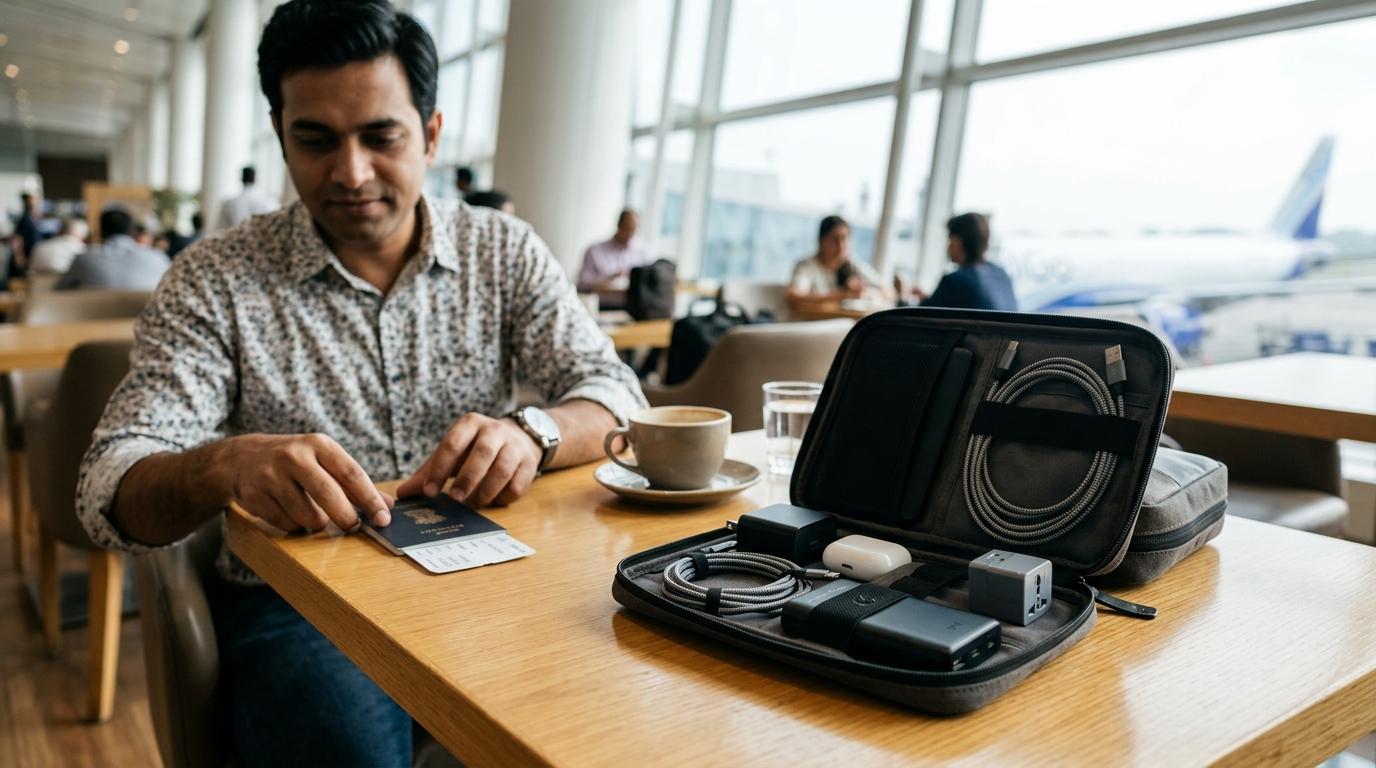
It should be compact, easy to open, a little water-resistant, and spacious enough for the things you actually carry: your charger, USB-C cable, earbuds, adapter, power bank, and maybe a few small dongles.
For most Indian flyers, students, and office commuters, a soft or semi-hard tech pouch under 25 cm is more useful than a big hard case. The trick is to buy for your real travel kit, not for every random cable sitting in your drawer.
Quick Summary
Helpful Related Reads
#If you are building a better travel tech kit, also read AllBlogs guides on portable fan and power bank rules for Indian flights, USB-C cable buying checks in India, universal travel adapter vs GaN charger, and eSIM OTP access abroad for Indian travelers.
Why a Travel Electronics Organizer Is Actually Useful
#If you travel from Indian airports often, or even carry a laptop bag to office every day, you probably know this small but irritating problem.
Your phone battery is low. The cable is somewhere inside the bag. The adapter is in another pocket. The earbuds are lying loose. The power bank has gone right to the bottom, under a notebook, snack packet, and maybe an old bill you forgot to throw away.
A travel electronics organizer solves this in the most basic way possible. It gives all your daily tech items one fixed place.
You do not need an expensive “gadget vault”. You just need a practical tech pouch that keeps your charger, cables, earbuds, adapter, and power bank visible and easy to pick up.
It saves time during airport security checks, prevents cables from bending badly, and stops small accessories from disappearing inside your bag.
But the wrong pouch can become one more bulky thing you regret buying.
So, let’s choose one properly.
Who Should Buy a Travel Electronics Organizer?
#Buy one if you are:
#A frequent flyerIf you carry a phone charger, laptop charger, USB-C cable, power bank, earbuds, and maybe a travel adapter, a dedicated electronics organizer can make packing and security checks much easier.
An office commuterIf your work bag carries a laptop charger, mouse dongle, earbuds, charging cable, and power bank every day, a compact charger organizer pouch is genuinely useful.
A studentIf you keep moving between college, hostel, library, and home, a small cable organizer bag can save your charger and earbuds from getting tangled with notebooks and stationery.
A family travellerOne pouch can hold shared charging cables, plug adapters, backup earbuds, and a power bank. Just don’t turn it into the entire family’s tech drawer.
Someone who keeps losing small accessoriesIf you often ask, “Where is my Type-C cable?” or “Where did I keep that adapter?”, you probably need one.
Who Should Avoid Buying One?
#Skip it if:
#You carry only one phone and one cableYour backpack’s built-in pocket is probably enough. A separate tech pouch may be unnecessary.
You want it only because it looks neat onlineA travel electronics organizer is useful only if it solves a real problem. Otherwise, it is just another pouch taking up space.
You want to store old cables you never useDo not buy a bigger pouch just to carry dead, frayed, or outdated cables. First remove the clutter, then decide what size you need.
You need serious protection for fragile equipmentIf you carry camera gear, external hard drives, or specialised electronics, you may need a more protective case, not a basic cable organizer bag.
What to Check Before Buying
#1. Keep the Size Sensible
#For most Indian flyers and commuters, a pouch around 20 to 25 cm long is enough.
That usually fits:
- One power bank
- One wall charger
- Two or three cables
- Earbuds
- Small adapters or dongles
Anything much bigger may start eating into your backpack or cabin bag space. It may look useful in product photos, but once it sits inside your bag, it can become annoying.
A simple rule: if the pouch is bigger than your actual tech kit, you are probably overbuying.
2. Check the Depth, Not Just Length and Width
#Many people check the length and width, but forget about depth. That is where mistakes happen.
A flat pouch may look stylish, but it may struggle with:
- A chunky laptop charging brick
- A 20,000mAh power bank
- A multi-port charger
- Universal travel plug adapters
Before buying, identify your thickest item. For most people, it is the power bank or laptop charger. The pouch should close without forcing the zipper.
If the product photos show only thin cables and earphones, be careful. It may not handle a real travel kit very well.
3. Look for Elastic Loops
#Loose cables tangle quickly. A good tech pouch for travel should have elastic loops or bands to keep cables in place.
You do not need twenty loops. You just need enough for your actual kit.
For most people, this is enough:
- One loop for the phone charging cable
- One loop for the laptop or tablet cable
- One loop for a backup cable
- One loop for earphones or a small wired accessory, if needed
The goal is not to make the pouch look full. The goal is to keep things easy to find.
4. Choose a Zippered Mesh Pocket
#A zippered mesh pocket is one of the most useful parts of a travel electronics organizer.
It can hold small items like:
- SIM ejector tool
- Small USB adapter
- Memory card
- Earbud tips
- USB-A to USB-C adapter
- Pen drive
Open pockets look nice in photos, but tiny items can slip out. A zip pocket is much safer.
5. Prefer a Light-Coloured Interior
#This sounds like a small detail until you are searching for a black cable inside a black pouch in a dark cab, train berth, or airplane cabin.
A light grey, beige, orange, or bright inner lining makes accessories easier to spot.
It is not a deal-breaker, but it is a very practical feature.
6. Water-Resistant Material Is Enough for Most People
#You do not need a heavy waterproof case for normal travel. A water-resistant nylon or polyester exterior is usually enough.
It helps against:
- Light rain while commuting
- A few drops of coffee
- Damp airport counters
- Minor spills inside a bag
Just remember: water-resistant does not mean waterproof. Do not assume you can soak the pouch or leave it in heavy rain.
7. Do Not Ignore the Zipper
#A tech pouch becomes useless very quickly if the zipper is poor.
Check reviews for comments about:
- Zipper getting stuck
- Stitching near the zipper coming loose
- Pull tab breaking
- Pouch not closing properly when full
A dual zipper is useful because you can open the pouch from either side. Also, if one pull becomes weak later, the second one may still keep the pouch usable.
8. Think About Airport Convenience
#If your organizer carries a power bank, keep it in your cabin baggage.
Power banks should not go in checked luggage. So your pouch should be easy to reach inside your backpack or cabin bag. Do not bury it under clothes.
At airport security, you may be asked to remove some electronics. A pouch that opens easily or has a small grab handle can make things smoother.
Which Type of Travel Electronics Organizer Should You Buy?
#Option 1: Soft Modular Tech Pouch
#This is the best choice for most people.
It is a flexible pouch with compartments, mesh pockets, and elastic loops. It can expand slightly when full and compress a little when empty.
Best for:
- Office commuters
- Students
- Weekend travellers
- Domestic flyers
- People carrying regular chargers, earbuds, cables, and a power bank
Pros:
- Lightweight
- Easy to fit inside backpacks
- Usually space-efficient
- Good for daily use
Cons:
- Less impact protection
- Not ideal for fragile drives or delicate equipment
Choose this if you want one practical charger organizer travel pouch for both work and flights.
Option 2: Semi-Hard Shell Case
#This type has a firmer outer shell and holds its shape even when empty.
Best for:
- People whose bags get squeezed often
- Travellers carrying external drives or slightly delicate accessories
- Anyone who wants better protection than a soft pouch
Pros:
- Better crush resistance
- Neater structure
- Protects contents better in packed bags
Cons:
- Bulkier
- Takes up the same space even when half empty
- Can feel unnecessary for a small daily kit
Choose this if protection matters more than saving bag space.
Option 3: Roll-Up Cable Organizer
#This is a flat organizer that rolls around your cables.
Best for:
- Minimal travellers
- People carrying mostly cables
- Those who want something very light
Pros:
- Slim
- Easy to pack
- Good for cable-only kits
Cons:
- Poor for power banks
- Poor for bulky chargers
- Can become awkward if overstuffed
Choose this only if you mostly carry cables, not gadgets.
Step-by-Step Buying Checklist
#Use this before adding anything to cart.
Step 1: Empty Your Current Tech Kit
#Put everything on a table.
Include:
- Phone charger
- Laptop charger
- USB-C cable
- Lightning cable, if needed
- Earbuds
- Power bank
- Adapter
- Dongle
- Pen drive
- SIM tool
- Travel plug
Now remove what you do not use.
Old cables, duplicate chargers, and broken adapters should not decide the size of your new pouch.
Step 2: Decide Your Real Everyday Kit
#For many travellers, a practical kit looks like this:
- One multi-port charger
- One or two charging cables
- One power bank
- Earbuds
- One or two small adapters
If your kit is this small, do not buy a large double-layer electronics organizer. A compact pouch is enough.
Step 3: Measure Your Bulkiest Item
#Your bulkiest item is usually one of these:
- Laptop charger
- 20,000mAh power bank
- Universal travel adapter
- Large multi-port charger
Check whether the pouch has enough depth for this item.
If the zipper looks strained in customer photos, avoid it.
Step 4: Choose the Right Format
#Pick based on your use:
- Daily commute: Soft pouch
- Domestic flights: Soft or semi-hard pouch
- Crush-prone backpack: Semi-hard case
- Cables only: Roll-up organizer
- Minimal phone-only setup: No separate organizer needed
Step 5: Check the Inside Layout
#Do not buy only because the outside looks nice.
Inside, look for:
- Elastic loops
- One zippered mesh pocket
- Enough space for a power bank
- Cable slots that are not too tight
- A layout that opens wide enough to see everything
A pouch that opens like a book is usually easier to use than one where everything is stacked blindly.
Step 6: Read Recent Reviews, Not Just Ratings
#Ratings can be misleading.
Before buying, read recent reviews and look at customer photos. Focus on:
- Actual size in hand
- Zipper quality
- Stitching
- Whether bulky chargers fit
- Whether the delivered product matches the listing photos
Be careful if the review text talks about a different product. Sometimes listings get reused or merged, and the star rating may not reflect the item you are actually buying.
Step 7: Compare the Real Selling Price
#Do not get impressed by huge discount claims.
A pouch showing “80% off” is not automatically a good deal. Compare the final selling price with similar products of the same size, material, and layout.
Also check whether the discounted product has poor zippers, thin material, or fake-looking reviews. A slightly costlier pouch that lasts longer is often the better buy.
Common Mistakes to Avoid
#Mistake 1: Buying Too Big
#This is the most common mistake.
A large travel electronics organizer feels useful at first because it can hold everything. Then it becomes heavy, bulky, and annoying.
You do not need to carry:
- Four charging cables for one phone
- Old micro-USB cables you never use
- Duplicate adapters
- Broken earphones
- Random dongles “just in case”
Carry what you actually use.
Mistake 2: Ignoring Power Bank Rules
#If your pouch contains a power bank, keep it in hand baggage.
Do not pack it inside checked luggage. Also, keep it easy to access during security checks.
A power bank pouch buried deep inside a suitcase defeats the purpose.
Mistake 3: Trusting “Shockproof” Claims Blindly
#Many basic pouches use words like “shockproof” or “heavy-duty” very casually.
Look at the structure instead:
- Is the outer shell firm?
- Is there padding?
- Does it hold its shape?
- Are the corners protected?
- Do reviews mention actual protection?
If it is just thin fabric, treat it as an organizer, not a protective case.
Mistake 4: Buying Without Checking Depth
#A pouch can look spacious in photos but fail with real chargers.
Always check whether it can handle thick items. If you carry a power bank and laptop charger, a very slim pouch may not work.
Mistake 5: Choosing Black Inside and Outside
#Black looks clean, but a fully black pouch can make small black accessories hard to find.
If possible, choose a pouch with a lighter interior. You will appreciate it later.
Mistake 6: Falling for Fake-Looking Reviews
#Watch out for these signs:
- Too many short reviews saying only “good product”
- Review photos that do not match the product
- Reviews mentioning a different item
- No recent photo reviews
- Complaints about zipper failure hidden among high ratings
Read the 2-star and 3-star reviews. They often reveal the real problems.
Mistake 7: Paying for Features You Will Not Use
#You may not need:
- Huge double-layer storage
- Hard-shell protection
- Too many cable slots
- Waterproof-style bulky zippers
- Extra compartments for gear you do not carry
Buy for your normal routine, not for some imaginary long trip you may take once a year.
Practical Size Guide for Indian Flyers
#Small Pouch
#Good for:
- One charger
- Two cables
- Earbuds
- Small adapter
Best for students, office commuters, and light travellers.
Avoid this size if you carry a large power bank or laptop charger.
Medium Pouch
#Good for:
- Power bank
- Multi-port charger
- Two or three cables
- Earbuds
- Dongles
- Small travel adapter
Best for most flyers.
This is the safest choice if you want one organizer for both office and travel.
Large Pouch
#Good for:
- Laptop charger
- Power bank
- Travel adapter
- Multiple cables
- Mouse dongle
- External storage
- Camera battery charger, if needed
Best only if you genuinely carry more electronics.
Avoid it if you are buying it just because it looks like better “value for money”.
What a Sensible Travel Tech Kit Looks Like
#A compact kit is easier to manage than a large pouch full of duplicate items.
For most people, this is enough:
- One reliable wall charger
- One main USB-C cable
- One backup cable, if needed
- One power bank
- Earbuds
- One small adapter or dongle
- Optional travel plug, only when needed
Once your kit is clean, choosing the right cable organizer bag becomes much easier.
Final Buying Advice
#The best travel electronics organizer is not the biggest one. It is the one you will actually carry.
For most Indian flyers, office commuters, and students, a medium soft tech pouch is the most practical choice. Pick one with a water-resistant exterior, elastic cable loops, a zippered mesh pocket, smooth zipper, and enough depth for your power bank or charger.
If your backpack gets crushed often, go for a semi-hard case. If you carry only cables, a roll-up organizer may be enough.
And before buying, do one simple thing: remove the tech you do not use. A smaller, better-organized kit is always better than a bulky pouch full of “just in case” clutter.