Category: Smart Buying & Reviews
If typing at your desk makes your shoulders creep up toward your ears, your desk is probably too high. In that case, a keyboard tray may help more than a new keyboard.
If your desk height feels fine but your wrists bend, your hands feel crowded, or your forearms get tense, an ergonomic keyboard might be the better upgrade.
And if your setup is mostly comfortable but just feels a little off, you may not need to buy much at all. A few small changes to your standard keyboard setup can make a surprising difference.
The best move is simple: don’t buy the accessory first. Figure out what’s actually causing the discomfort.
Short Answer
#If you’re stuck comparing an ergonomic keyboard vs keyboard tray, use this quick rule:
- Buy a keyboard tray if your desk is too high and your shoulders or arms feel lifted while typing.
- Buy an ergonomic keyboard if your wrists bend outward or upward, or your hands feel cramped.
- Improve your standard keyboard setup first if your desk height is mostly fine, but the angle, distance, or mouse position feels wrong.
A keyboard tray changes where your keyboard sits.
An ergonomic keyboard changes how your hands rest.
A better standard setup fixes the small stuff without replacing everything.
Who This Guide Is For
#This guide is for anyone who spends a lot of time typing: home office workers, students, freelancers, gamers, writers, programmers, and people using a dining table as a desk.
It’s especially useful if you’ve wondered:
- Do I need an ergonomic keyboard, or is my desk the real problem?
- Is a keyboard tray worth it for a fixed-height desk?
- Can I make my current keyboard more comfortable?
- Why do my wrists, shoulders, or forearms feel tired after typing?
- What should I check before buying more desk gear?
Quick note: this is not medical advice. A better setup can make typing more comfortable, but it can’t diagnose or treat wrist, nerve, shoulder, or back problems. If you have sharp pain, numbness, weakness, or symptoms that keep getting worse, talk to a qualified health professional.
The Big Question: Is It a Keyboard Problem or a Desk Problem?
#Before you spend money, try to separate the issue into two categories:
- Your keyboard is at the wrong height.
- Your hands don’t sit comfortably on the keyboard.
Those sound similar, but they usually need different fixes.
1. You May Have a Desk Height Problem
#Sometimes the keyboard itself is not the issue. The desk is just too high for relaxed typing.
This is common with fixed-height desks, dining tables, thick tabletops, and desks designed more for writing than computer work.
Signs your desk height may be the problem:
- Your shoulders rise when you type.
- Your elbows drift away from your sides.
- You feel like you have to lift your arms to reach the keyboard.
- Raising your chair helps your arms, but then your feet don’t rest flat.
- Your wrists feel better when the keyboard is lower than the desktop.
If this sounds familiar, a keyboard tray is usually the better first fix.
2. You May Have a Hand Position Problem
#Your desk height might be okay, but your keyboard shape may not match the way your hands naturally rest.
Signs your hand position may be the problem:
- Your wrists bend outward toward the sides.
- Your hands feel squeezed together.
- Your wrists bend upward while typing.
- You keep shifting your hands around during long work sessions.
- Your forearms feel tense even when your shoulders are relaxed.
If this sounds more like your situation, an ergonomic keyboard may help more than a tray.
3. You May Just Need Small Setup Changes
#Not every uncomfortable desk needs a major upgrade. Sometimes the fix is cheaper and easier.
You may only need to adjust your standard keyboard setup if:
- Your desk height feels okay.
- Your shoulders stay relaxed.
- Your wrists are mostly straight.
- You mainly dislike the keyboard angle, distance, or desk layout.
- You want to try free or low-cost fixes before buying new gear.
In that case, start with small changes before replacing your keyboard or installing a tray.
What to Check Before Buying Anything
#Use this quick desk comfort checklist before choosing between an ergonomic keyboard, keyboard tray, or standard keyboard adjustment.
Check 1: Are Your Shoulders Relaxed?
#Sit at your desk the way you normally work. Don’t force perfect posture. Just sit how you actually sit.
Place your hands on the keyboard and ask:
- Are my shoulders relaxed?
- Are my elbows close to my body?
- Am I reaching forward?
- Am I lifting my arms to type?
If your shoulders are raised, your keyboard is probably too high or too far away. A new ergonomic keyboard won’t fully fix that if it still sits on the same too-high desk.
Check 2: Do Your Elbows Feel Comfortable?
#Your elbows don’t need to be at a perfect textbook angle. They just shouldn’t feel like they’re floating, lifted, or forced into position.
In general, your forearms should feel roughly level or slightly angled downward. If your elbows are pushed up because the desktop is high, look at a keyboard tray first. You probably need to change the keyboard height, not just the keyboard shape.
Check 3: Are Your Wrists Straight?
#Look at your wrists while you type.
Watch for:
- Wrists bending upward.
- Wrists dropping downward.
- Hands angled sharply outward.
- Palms pressing hard into the desk while your fingers reach up.
A good wrist comfort keyboard setup usually keeps your wrists closer to neutral. That can come from a flatter keyboard, a better keyboard angle, an ergonomic keyboard, or a tray set at the right height.
Check 4: Are You Using the Keyboard Feet?
#Many standard keyboards have small flip-up feet in the back. People often assume they’re there to make typing more comfortable.
Sometimes they do the opposite.
Raising the back of the keyboard can make your wrists bend upward more. If your wrists already feel strained, fold the feet down and try typing with the keyboard flat for a few days.
It costs nothing, and it might help.
Check 5: Do Your Chair and Feet Work Together?
#If you raise your chair to match a high desk, your feet may start dangling. That can make your whole posture feel unstable.
A footrest can help if the chair height feels right for your arms but wrong for your feet. But if the typing height still feels off, a keyboard tray may be the cleaner fix.
Check 6: Is There Room Under Your Desk?
#Before buying a tray, look under your desk carefully. This is where a lot of people get surprised.
Check for:
- Metal crossbars.
- Thick support beams.
- Drawers.
- Cable trays.
- Uneven undersides.
- Glass tops or thin tabletops.
- Chair arms that may hit the tray.
A keyboard tray can be a great upgrade, but only if your desk can actually support one.
Option 1: Ergonomic Keyboard
#An ergonomic keyboard changes the shape, angle, or layout of the keyboard so your hands can rest in a more natural position.
Common types include:
- Split keyboards.
- Curved keyboards.
- Tented keyboards.
- Compact ergonomic keyboards.
- Low-profile ergonomic keyboards.
Some split keyboards keep both sides connected. Others let you separate the two halves so you can place them closer to shoulder width.
Best For
#An ergonomic keyboard is best if:
- Your desk height already feels comfortable.
- Your shoulders stay relaxed while typing.
- Your wrists bend outward on a normal keyboard.
- Your hands feel cramped.
- You type for long sessions.
- You’re willing to adjust to a slightly different layout.
Avoid If
#Don’t make an ergonomic keyboard your first upgrade if:
- Your desk is clearly too high.
- You type with raised shoulders.
- You can’t place your keyboard close enough to your body.
- Other people use your setup and need it to stay simple.
- You hate learning new layouts.
An ergonomic keyboard can improve hand position, but it won’t fix a desk that puts your arms at the wrong height.
What to Look For in an Ergonomic Keyboard
#Use this mini ergonomic keyboard buying guide:
- Split or curved layout: Helpful if your wrists angle outward on a regular keyboard.
- Low profile: Good if tall keys make your wrists bend upward.
- Tenting: Can reduce forearm twisting for some people, but it should feel natural, not forced.
- Compact size: Helps bring your mouse closer to your body.
- Familiar layout: Useful if you switch between computers often or don’t want a steep learning curve.
- Return policy: Comfort is personal. A keyboard that feels amazing to someone else might feel strange to you.
Option 2: Keyboard Tray
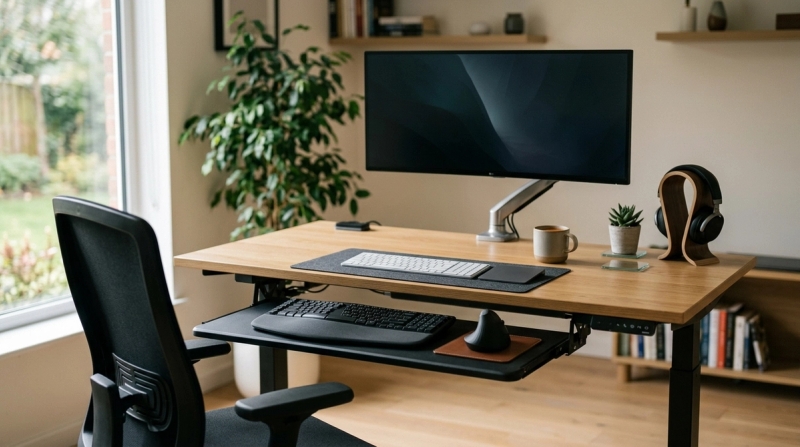
#A keyboard tray mounts under your desk and lets your keyboard sit lower than the desktop. Some trays slide in and out. Some adjust for height and tilt. Others are fixed.
The main benefit is simple: a tray separates your typing height from your desk height.
That matters because many desks are fine for monitors, notebooks, and general work, but too high for relaxed typing.
Best For
#A keyboard tray is best if:
- Your desk surface is too high for typing.
- Your shoulders lift when your hands are on the keyboard.
- Your chair can’t solve the height problem comfortably.
- You use a fixed-height desk.
- You work at a dining table or thick tabletop.
- You want more space on your desktop.
- You want the keyboard slightly below the desk surface.
Avoid If
#Avoid a keyboard tray if:
- Your desk is already at the right typing height.
- Drawers, beams, or bars block installation.
- You use a glass desk or weak tabletop.
- Your chair armrests will hit the tray.
- You move your keyboard around a lot.
- You don’t want to drill, clamp, or install anything.
A tray is not automatically ergonomic. If it sits too low, too far away, wobbles, or forces an awkward angle, it can create a new problem instead of solving the old one.
What to Look For in a Keyboard Tray
#Use this short keyboard tray buying guide:
- Height adjustment: Helpful if you need a more precise typing height.
- Tilt adjustment: Useful for keeping the keyboard flat or slightly tilted away from you.
- Enough width: Make sure it fits your keyboard and mouse if you want both on the tray.
- Stable surface: A wobbly tray gets annoying fast.
- Clear installation space: Measure the underside of your desk before buying.
- Slide depth: Check that it pulls out far enough and tucks away neatly.
- Knee clearance: Make sure it won’t bump your legs.
Option 3: Standard Keyboard Setup
#A standard keyboard can still be comfortable. It just needs the right height, angle, distance, and mouse position.
You don’t always need a split keyboard or a tray. Sometimes the fix is smaller than you think.
Best For
#A standard keyboard setup is best if:
- Your desk height is already comfortable.
- Your wrists stay fairly straight.
- Your shoulders are relaxed.
- You like your current keyboard.
- You share the desk with someone else.
- You want the simplest setup possible.
- You only need small angle or distance changes.
Avoid If
#Don’t rely on a standard setup alone if:
- Your desk is clearly too high.
- Your wrists bend sharply while typing.
- You constantly raise your shoulders.
- You need to raise your chair so high that your feet dangle.
- You already tried small adjustments and still feel uncomfortable.
Ways to Improve a Standard Keyboard Setup
#Try these before buying something expensive:
- Move the keyboard closer to your body.
- Keep the keyboard flat instead of using the rear feet.
- Move the mouse closer to the keyboard.
- Use a compact keyboard if your mouse sits too far away.
- Raise your chair if the desk is only slightly high.
- Add a footrest if raising the chair leaves your feet unsupported.
- Clear desk clutter so your arms aren’t reaching around things.
- Avoid pressing your wrists hard into the desk edge while typing.
A standard keyboard isn’t automatically bad. It just needs to be set up in a way that fits your body and your work habits.
Comparison: Ergonomic Keyboard vs Keyboard Tray vs Standard Keyboard Setup
#Ergonomic keyboard
- Main purpose: Improves hand and wrist position.
- Best for: Wrist angle, hand spacing and forearm comfort.
- Fixes desk height? No.
- Setup effort: Usually low.
- Learning curve: Possible, especially with split layouts.
- Main risk: Buying one when desk height is the real issue.
Keyboard tray
- Main purpose: Lowers the keyboard below the desktop.
- Best for: High desks, fixed desks and raised shoulders.
- Fixes desk height? Yes, if installed correctly.
- Setup effort: Medium to high.
- Learning curve: Low after installation.
- Main risk: Bad fit, poor installation or wrong height.
Standard keyboard setup
- Main purpose: Fine-tunes a setup that mostly works.
- Best for: Small comfort and angle changes.
- Fixes desk height? Only a little, through chair or placement changes.
- Setup effort: Low.
- Learning curve: None.
- Main risk: Ignoring a bigger desk-height or wrist-position problem.
Best For / Avoid If Summary
#Ergonomic Keyboard
#Best for:
- Wrists bending outward.
- Hands feeling cramped.
- Desk height already feeling right.
- People willing to adapt to a new layout.
Avoid if:
- Your shoulders rise while typing.
- Your desk is too high.
- You want zero learning curve.
Keyboard Tray
#Best for:
- High desks.
- Fixed desks.
- Dining table workstations.
- People who need the keyboard lower than the desktop.
Avoid if:
- Your desk can’t support installation.
- You already type at a comfortable height.
- The tray would push you too far from the screen.
Standard Keyboard Setup
#Best for:
- Minor comfort changes.
- Shared desks.
- Simple workstations.
- People who already type with relaxed shoulders and mostly straight wrists.
Avoid if:
- Your desk height is wrong.
- Your wrists bend sharply.
- You’ve tried basic adjustments and it still feels bad.
Step-by-Step Buying Checklist
#Follow this order before you buy anything.
Step 1: Sit Normally at Your Desk
#Don’t sit like you’re posing for an ergonomic brochure. Sit how you actually work.
Put your hands on the keyboard and notice what feels off.
Step 2: Check Your Shoulders
#If your shoulders are lifted, your keyboard is probably too high or too far away.
Possible fix: keyboard tray or chair height adjustment.
Step 3: Check Your Elbows
#Your arms should feel relaxed, not suspended. If your elbows feel pushed upward, the desk is probably too high for typing.
Possible fix: keyboard tray.
Step 4: Check Your Feet
#If raising your chair helps your arms but your feet no longer rest comfortably, try a footrest.
Possible fix: footrest plus current keyboard, or keyboard tray if the desk still feels too high.
Step 5: Check Your Wrists
#If your shoulders feel fine but your wrists bend outward or upward, the keyboard shape or angle may be the issue.
Possible fix: ergonomic keyboard or flatter keyboard angle.
Step 6: Flatten Your Current Keyboard
#If you use the rear keyboard feet, fold them down and type with the keyboard flat.
Possible fix: standard keyboard setup adjustment.
Step 7: Move the Mouse Closer
#If your keyboard is wide and your mouse sits far away, your shoulder may be reaching all day without you noticing.
Possible fix: compact standard keyboard or compact ergonomic keyboard.
Step 8: Check Under-Desk Space
#Before buying a tray, measure and inspect the underside of your desk.
Look for bars, drawers, cable trays, and anything else that could block mounting.
Possible fix: different tray style, or skip the tray if your desk is not compatible.
Step 9: Choose Based on the Real Problem
#Use this final rule:
- Desk too high? Buy a keyboard tray.
- Wrist angle wrong? Buy an ergonomic keyboard.
- Setup mostly fine? Improve your standard keyboard setup first.
Step 10: Test Slowly
#Don’t change everything at once. Adjust one thing, work with it for a few days if you can, then decide whether you need another change.
Common Mistakes to Avoid
#Mistake 1: Buying an Ergonomic Keyboard When the Desk Is Too High
#This is one of the most common mistakes.
If your shoulders are raised, a new keyboard shape probably won’t fix the main problem. You may still be typing too high, just on a nicer keyboard.
Fix the height problem first.
Mistake 2: Buying a Tray Without Checking Under the Desk
#Not every desk can take a keyboard tray.
Drawers, metal frames, thick crossbars, glass tops, and cable trays can all get in the way. Measure first, because returns are annoying.
Mistake 3: Assuming a Keyboard Tray Is Always Better
#A tray helps when it puts your keyboard at a better height. It does not help if it sits too low, wobbles, blocks your knees, or pushes you away from your monitor.
The fit matters more than the accessory.
Mistake 4: Using the Keyboard Feet Without Thinking
#The rear feet on a standard keyboard can make the keyboard slope upward. For some people, that means more wrist bending.
Try typing with the keyboard flat for a while. You might be surprised.
Mistake 5: Ignoring the Mouse
#Keyboard comfort and mouse comfort are connected.
If a large keyboard pushes your mouse far to the side, your shoulder has to work harder all day. A compact keyboard, better mouse placement, or a tray wide enough for both keyboard and mouse can help.
Mistake 6: Copying Someone Else’s Setup
#A setup that works great for a tall person might feel terrible for a shorter person. A clean-looking desk online can still be wrong for your body.
Build around your seated elbow height, wrist position, and actual work habits, not someone else’s photo.
Mistake 7: Expecting Accessories to Fix Pain Overnight
#A better setup can support comfort, but it’s not magic and it’s not medical treatment.
If you have ongoing numbness, sharp pain, weakness, or symptoms that keep coming back, get professional advice.
Quick Buying Scenarios
#Scenario 1: Your Desk Is Too High, but You Like Your Keyboard
#Buy a keyboard tray first.
You don’t need to replace a keyboard you already like if the real problem is height.
Scenario 2: Your Desk Height Feels Fine, but Your Wrists Angle Outward
#Look at an ergonomic keyboard.
A split or curved design may fit your hands better than a flat rectangular keyboard.
Scenario 3: You Work at a Dining Table
#A keyboard tray may help, but only if the table can support one. If it can’t, adjust your chair height, use a footrest if needed, and keep the keyboard flat and close.
Scenario 4: You Use a Laptop Stand or Monitor Arm
#Once your screen is raised, your external keyboard and mouse placement matter more.
If the desk is high, consider a tray. If the desk height feels fine but your wrists feel awkward, consider an ergonomic keyboard.
Scenario 5: You’re Not Sure What’s Wrong
#Start with the free checks:
- Flatten the keyboard.
- Move it closer.
- Adjust chair height.
- Check your feet.
- Move the mouse closer.
- Notice whether the main discomfort is in your shoulders or wrists.
Then buy based on the pattern.
Final Recommendation
#If you’re choosing between an ergonomic keyboard vs keyboard tray, don’t start with the product. Start with the problem.
Choose a keyboard tray if your desk height forces your arms and shoulders up.
Choose an ergonomic keyboard if your wrists and hands feel awkward even when your desk height is comfortable.
Stick with a better standard keyboard setup if your posture is mostly fine and you only need small adjustments.
The best desk comfort upgrade is not the fanciest one. It’s the one that fixes the actual weak spot in your setup.