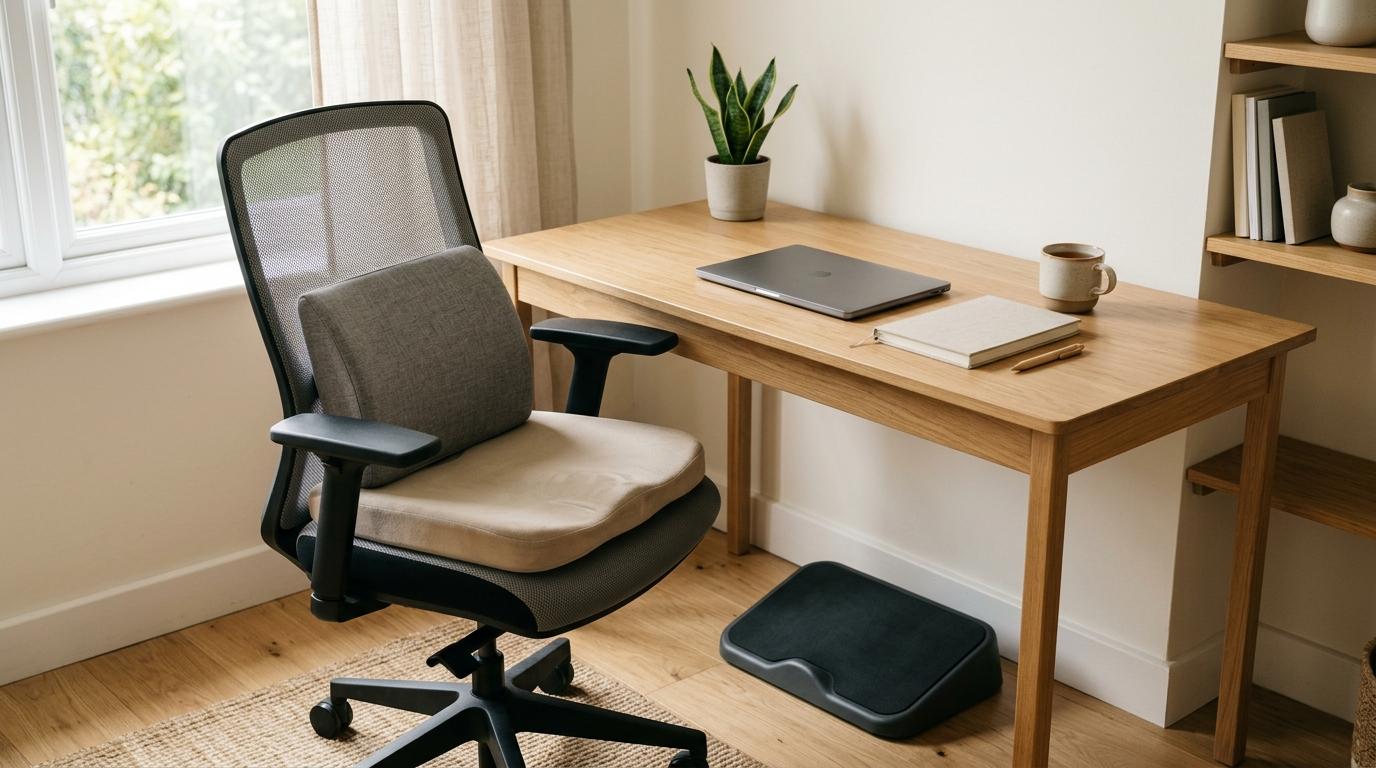
Trying to decide between a lumbar pillow, seat cushion, or footrest? Before you buy anything, start with the free fixes.
Adjust your chair. Check your typing height. Look at where your feet land. Pay attention to where the discomfort actually shows up.
A lot of desk discomfort comes from one simple mismatch:
- Your chair is too low for your desk.
- Your feet do not reach the floor.
- Your lower back has no support.
- Your seat is too hard or worn out.
If your feet dangle once your chair is at the right height for typing, start with a footrest.If your lower back rounds or aches, try a lumbar support pillow.If your tailbone, sit bones, or thighs hurt from the chair itself, a seat cushion probably makes the most sense.
And if none of those problems clearly apply, you may not need to buy anything yet.
Quick Summary
#If lower back aches, slouching, or rounded posture is the problem: buy a lumbar support pillow first because it supports the natural curve of your lower back.
If your feet dangle after raising your chair: buy an ergonomic footrest first because it gives your feet a stable place to rest.
If your tailbone hurts or your chair feels hard: buy a seat cushion first because it reduces pressure under your pelvis and thighs.
If you have not adjusted anything yet: buy nothing yet because basic setup changes may fix the issue.
If your chair already feels balanced and supportive: you can probably skip extra gear because unnecessary accessories can create new problems.
Simple buying order for most desk workers:
- Try free adjustments first.
- Get lumbar support if your lower back rounds or aches.
- Add a footrest if your feet do not sit flat.
- Add a seat cushion if your chair causes pressure or tailbone pain.
Who This Guide Is For
#This guide is for desk workers who want to feel more comfortable without buying a whole new chair or turning their home into an office showroom.
It is especially useful if you are:
- Working from a bedroom, small apartment, or shared space
- Using a dining chair, budget office chair, or older chair
- Studying for long hours
- Building a home office on a budget
- Trying to make your current chair more comfortable
- Unsure whether the problem is your back, seat, or feet
This is not about creating a perfect ergonomic setup. Most people do not need every accessory.
The better question is:
What does your body actually need first?
That is where this desk comfort buying guide can help.
Check These Things Before Buying Anything
#Before you order a lumbar pillow, seat cushion, or footrest, do a quick setup check. Many comfort problems come from small mismatches between your chair, desk, screen, and feet.
1. Check Your Chair Height
#Sit close enough to your desk that you can type without reaching forward.
Your elbows should be around a 90-degree angle when your hands are on the keyboard or desk. You should not have to shrug your shoulders, lift your arms, or lean forward just to type.
If your chair is too low, your shoulders may tense up.
If your chair is too high, your feet may dangle.
That second problem is where a footrest can be genuinely helpful.
2. Check Your Feet After Adjusting Your Chair
#This step matters more than people think.
Do not check your feet first. Set your chair to a comfortable typing height first. Then look down.
Ask yourself:
- Are both feet flat on the floor?
- Do your knees and thighs feel relaxed?
- Is the front edge of the chair pressing into your thighs?
- Do you tuck your feet under the chair because they do not reach the floor comfortably?
- Do you sit forward because you cannot plant your feet while sitting back?
If your feet rest flat and feel supported, you probably do not need a footrest.
If your feet dangle, barely touch, or feel awkward, an ergonomic footrest may be the best first purchase.
3. Check Your Lower Back
#Now sit all the way back in your chair.
Ask yourself:
- Does your lower back feel unsupported?
- Do you collapse into a rounded posture?
- Do you lean forward because the chair back feels too far away?
- Does your lower back get tired before anything else?
- Do you feel better when you place a small cushion or rolled towel behind your back?
If yes, a lumbar support pillow is probably the better first buy.
4. Check the Seat Itself
#Now focus on the pressure under your body.
Ask:
- Does your tailbone hurt?
- Do your sit bones feel sore?
- Is your chair seat hard, thin, or flattened?
- Do your thighs feel pressure from the front edge of the seat?
- Does the chair feel fine at first but uncomfortable after an hour or two?
If the main issue is pressure, not back support or foot position, a seat cushion may help more than a lumbar pillow.
5. Ask If You Need to Buy Anything at All
#This is the step a lot of people skip.
If your feet are flat, your back feels supported, and your seat is not causing pressure, you may not need an accessory right now.
A comfort product should solve a clear problem. If you buy something just because your setup does not look “ergonomic enough,” you may end up creating a new issue.
Lumbar Pillow vs Seat Cushion vs Footrest: What Each One Actually Fixes
#These three products often get grouped together, but they do very different jobs.
A lumbar pillow supports your lower back.A footrest supports your feet when the floor is too far away.A seat cushion reduces pressure under your body.
Buying the wrong one can feel frustrating because it does not fix the real problem.
1. Lumbar Support Pillow
#A lumbar support pillow sits between your lower back and the chair. Its job is to support the natural inward curve of your lower spine.
When you sit for hours, especially in a flat-backed chair, your lower back can round forward. That rounded position can lead to tiredness, stiffness, and aching.
A lumbar pillow fills the gap behind your lower back so your muscles do not have to work as hard to keep you upright.
Best For
#A lumbar support pillow is best if:
- Your lower back aches during desk work
- You slouch or round forward often
- Your chair has a flat or weak backrest
- You use a dining chair or basic office chair
- You feel better with a small cushion or rolled towel behind your lower back
Avoid If
#Be careful with a lumbar pillow if:
- Your chair already has strong built-in lumbar support
- The pillow pushes you too far forward
- You cannot sit back comfortably with it in place
- Your main problem is tailbone pressure, not back support
Buying Tip
#Look for a pillow that supports your lower back without forcing you into an exaggerated posture.
If it makes you feel like you are perched on the edge of the chair, it is probably too thick for your setup.
2. Ergonomic Footrest
#An ergonomic footrest is useful when your chair needs to be raised for typing, but your feet no longer rest flat on the floor.
This happens a lot with higher desks, fixed-height tables, and shorter users. Once your chair is raised to a comfortable height for your arms, your feet may dangle. That can put pressure under your thighs and make it harder to sit fully back in the chair.
A footrest does not magically fix every desk setup. It simply brings the floor up to your feet.
And sometimes, that is exactly what you need.
Best For
#A footrest is best if:
- Your feet do not reach the floor after adjusting your chair
- Your thighs press into the front edge of the seat
- Your legs feel unsupported
- You use a high desk or table
- Most chairs feel too tall once they are adjusted for typing
Avoid If
#Do not buy a footrest by default if:
- Your feet already rest flat on the floor
- Your chair and desk height already feel balanced
- You are trying to fix lower back pain caused by poor back support
- You have not adjusted your chair height yet
Buying Tip
#A good footrest should help you sit back with both feet supported.
If it crowds your knees, slides around, or puts your legs at a strange angle, it is not helping much.
3. Seat Cushion
#A seat cushion is mainly about pressure relief.
If your chair is hard, thin, or worn out, pressure can build around your tailbone, sit bones, and thighs. A cushion can spread your weight more evenly and make a rough chair easier to sit on.
But a seat cushion is not always the best first purchase.
Why? Because it can raise your sitting height by 1 to 2 inches. That sounds minor, but it can change the whole setup. Your feet may stop reaching the floor, your knees may sit differently, and you may suddenly need a footrest.
Best For
#A seat cushion is best if:
- Your tailbone hurts
- Your chair padding has flattened out
- You sit on a hard wooden, plastic, or thinly padded chair
- Your sit bones feel sore after long work sessions
- Your main problem is pressure under your body, not back posture
Avoid If
#Be careful with a seat cushion if:
- Your chair is already soft and supportive
- Raising your seat height would make your feet dangle
- Your desk already feels too low
- Your main issue is lower back rounding
Buying Tip
#A thicker cushion is not automatically better.
If it lifts you too high, it may solve one problem and create another.
Comparison: Which Should You Buy First?
#Here is the simple version:
- Lumbar support pillow: Supports the lower back curve. Buy first when your lower back aches, rounds, or feels unsupported. Avoid when your chair already has strong lumbar support or the pillow pushes you forward.
- Ergonomic footrest: Supports your feet when the floor is too low. Buy first when your feet dangle after your chair is set correctly. Avoid when your feet already rest flat on the floor.
- Seat cushion: Reduces seat pressure. Buy first when your tailbone, sit bones, or thighs hurt. Avoid when it raises you too high or your chair is already soft.
- No purchase yet: Saves money. Choose this when you have not tried free adjustments. Avoid waiting only if you have a clear recurring comfort problem.
The Easiest Decision Path
#Use this order:
- Adjust your chair for typing.
- Check your feet.
- Check your lower back.
- Check pressure under your body.
- If all three seem fine, buy nothing yet.
Best For and Avoid If
#Lumbar Pillow
#Best for:
- Lower back fatigue
- Slouching
- Flat-backed chairs
- Dining chair work setups
- People who need back support more than seat softness
Avoid if:
- Your chair already has firm lumbar support
- The pillow makes you sit too far forward
- Your discomfort is mostly tailbone pressure
Footrest
#Best for:
- Dangling feet
- High desks
- Shorter users
- Thigh pressure from sitting too high
- Setups where the chair must be raised for typing
Avoid if:
- Your feet already rest comfortably on the floor
- You have not adjusted your chair yet
- You expect it to fix an unsupported lower back
Seat Cushion
#Best for:
- Hard chairs
- Flattened chair padding
- Tailbone discomfort
- Sit-bone soreness
- Pressure under your thighs or pelvis
Avoid if:
- Your chair is already soft
- Extra height will make your feet dangle
- Your main issue is lower back support
No Purchase Yet
#Best for:
- People who have not adjusted their setup
- Mild discomfort that changes with posture
- Anyone unsure where the pain or pressure is coming from
- Budget-conscious desk workers who do not want to overbuy
Avoid if:
- You have a clear recurring comfort issue
- Your feet dangle every day
- Your back has no support
- Your chair causes obvious pressure
What Should Most Desk Workers Buy First?
#For many desk workers, the best first purchase is a lumbar support pillow, because lower back rounding is common in basic chairs.
But that does not mean everyone should buy one first.
If your feet do not touch the floor after your chair is set to the right typing height, a footrest may be more important. Without foot support, it is hard to sit back properly, even if you have a good lumbar pillow.
If your chair feels like sitting on a board, or your tailbone hurts before your back does, a seat cushion may be the smarter first upgrade.
So the real answer is:
- Buy a lumbar pillow first for back support.
- Buy a footrest first for dangling feet.
- Buy a seat cushion first for pressure pain.
- Buy nothing yet if free adjustments solve the issue.
That is the most practical way to improve a home office comfort setup without wasting money.
When You Might Need Two Items
#Sometimes one accessory is not enough because the problems are connected.
For example:
- A lumbar pillow helps you sit back, but then you notice your feet do not reach the floor.
- A seat cushion relieves tailbone pressure, but raises you high enough that your feet start dangling.
- A footrest supports your feet, but your lower back still collapses because the chair back is flat.
The most common useful pairing is a lumbar pillow plus footrest. The pillow supports your lower back, and the footrest supports your feet when the chair is raised.
A seat cushion plus footrest can also make sense if the cushion raises your seat height and your feet no longer sit flat.
A lumbar pillow plus seat cushion can work if you need both back support and pressure relief. Just make sure the combination does not push you too far forward or lift you too high.
Mistakes to Avoid
#1. Buying a Footrest Just Because It Sounds Ergonomic
#A footrest is not a universal upgrade. It is useful when your feet actually need support.
If your feet already rest flat on the floor after your chair is adjusted, a footrest may not do much. Your money may be better spent on back support, seat comfort, or nothing at all.
2. Buying a Thick Seat Cushion Without Checking Height
#A seat cushion can raise your sitting height by 1 to 2 inches. That can change your desk setup more than you expect.
Before buying one, ask:
- Will my feet still reach the floor?
- Will my knees feel cramped?
- Will I sit too high for my desk?
- Will I need a footrest afterward?
A cushion can help, but it can also create a new problem if the rest of the setup does not match.
3. Using a Lumbar Pillow That Is Too Large
#A lumbar pillow should support your lower back, not shove your whole body forward.
If you feel like you are sliding off the front of the chair, the pillow may be too thick, too high, or simply wrong for that chair.
4. Replacing Your Chair Too Soon
#A new chair can be expensive. And honestly, it may not be necessary if your current chair still works.
If the height adjustment, seat base, wheels, and backrest are usable, a lower-cost accessory may improve comfort enough for now.
Save the bigger purchase for when the chair is truly worn out, broken, unstable, or impossible to adjust.
5. Trying to Fix Every Discomfort With One Product
#A lumbar pillow will not soften a hard seat.A seat cushion will not support your lower back.A footrest will not fix a chair back with no support.
Match the product to the problem.
Not fancy. Just useful.
Final Buying Recommendation
#If you want the safest spending order, use this:
- Buy nothing first. Adjust your chair, desk, monitor, and foot position.
- Buy a lumbar support pillow if your lower back rounds, aches, or feels unsupported.
- Buy an ergonomic footrest if your feet do not rest flat after your chair is set for typing.
- Buy a seat cushion if your chair is hard, flattened, or causing tailbone or sit-bone discomfort.
For most people comparing lumbar pillow vs seat cushion vs footrest, the best first buy is the one that solves the most obvious mismatch.
Do not buy the accessory that sounds the most ergonomic.
Buy the one your chair is clearly missing.