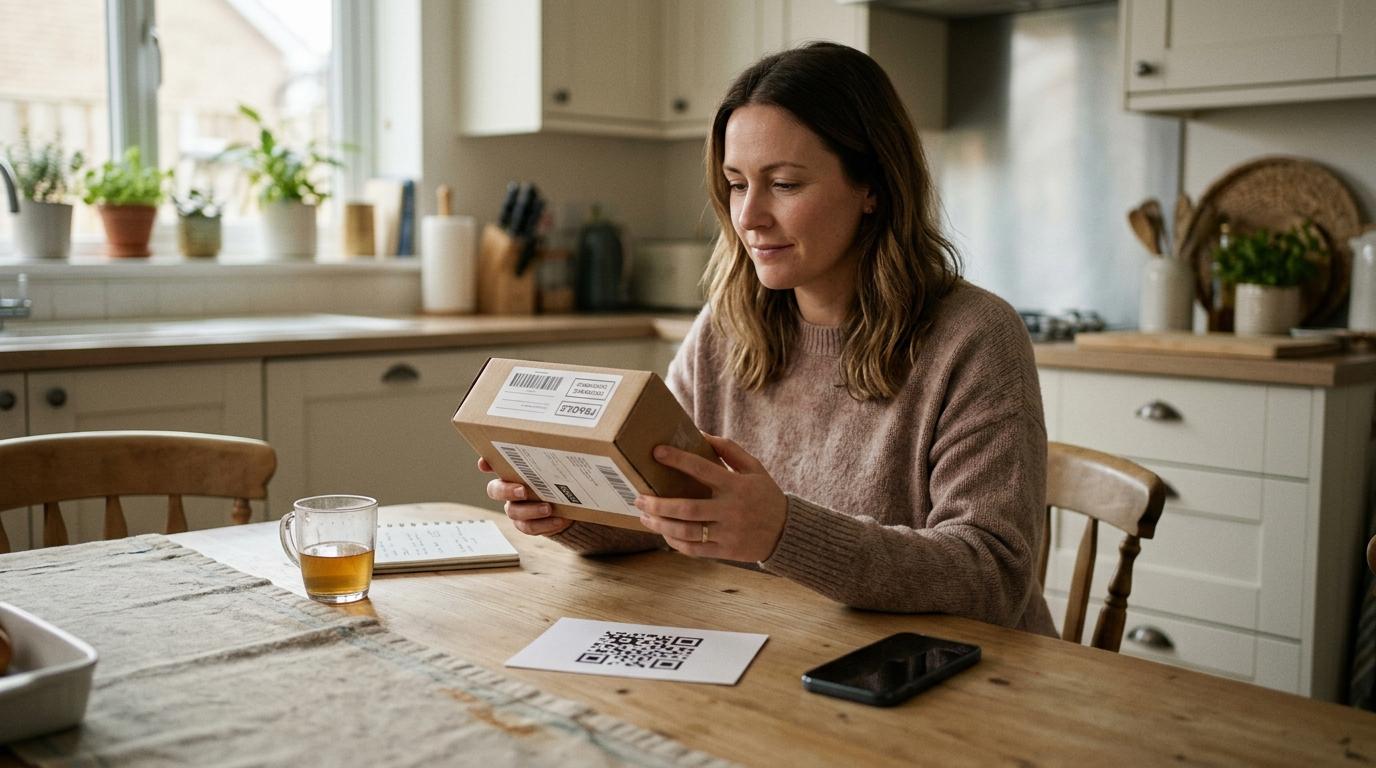
A package shows up at your door. Your name is on it. You didn’t order it.
Inside, there’s some small item you don’t recognize — maybe a keychain, scarf, phone accessory, gadget, or random household thing. Then you spot a card with a QR code.
It says something like:
“Scan to see who sent your gift.”
That little moment of curiosity is exactly what scammers are counting on.
If you receive an unexpected package with a QR code inside, don’t scan it right away. In fact, don’t scan it at all unless you can verify where it came from. That QR code could send you to a fake website designed to steal passwords, payment details, verification codes, or other personal information.
Think of a QR code like a link you can’t read at first glance. If you wouldn’t click a strange link in a random text message, don’t scan a strange QR code from a mystery package.
Why a QR Code in a Surprise Package Can Be Risky
#This kind of scam works because the package feels real.
It has your name. It has your address. It arrived through an actual delivery service. That makes it feel more believable than a spam email or suspicious text.
But the QR code may be the dangerous part.
The note inside may say:
- “Scan to find out who sent your gift”
- “Scan to register your product”
- “Scan to claim your reward”
- “Scan for return instructions”
- “Scan to confirm delivery”
- “Scan to verify your address”
- “Scan to pay unpaid postage”
Once scanned, the code may open a fake website that looks like a delivery company, retailer, bank, payment page, or customer support form.
From there, the scam may ask for:
- Your name, address, or phone number
- Email login details
- Bank or credit card information
- Account passwords
- One-time verification codes
- A small “shipping” or “return” fee
- An app, file, or software update download
The goal is usually simple: get you to trust the page long enough to type something valuable.
The FTC, FBI, and U.S. Postal Inspection Service have all warned consumers about QR code scams, especially when they appear in unexpected messages, delivery notices, public places, or suspicious packages.
The safest rule is this:
Treat a suspicious QR code the same way you’d treat a suspicious link.
Don’t scan first and think later.
Quishing and Brushing: What These Scams Mean
#Two scam tactics often come up in situations like this: quishing and brushing.
What Is a Quishing Scam?
#A quishing scam is phishing through a QR code.
Instead of sending you a suspicious email link, scammers give you a QR code to scan. The code sends you to a fake page that may look legitimate.
It might pretend to be:
- A delivery company
- A bank
- An online store
- A parking payment site
- A government service
- A login screen
- A product registration page
The scammer wants you to enter something they can use, such as:
- Passwords
- Credit card numbers
- Banking details
- Verification codes
- Personal information
- Account login details
A QR code can hide the destination until you scan it. That makes it easier for scammers to trick people into opening links they would never click if they saw the full address first.
What Is a Brushing Scam QR Code?
#A brushing scam happens when someone sends unordered merchandise to real people at real addresses.
In older brushing scams, shady sellers used this trick to create fake “verified buyer” reviews on online marketplaces. They would ship cheap items to random people, then use the shipment record to post fake reviews.
Now, some scammers add QR codes to those packages.
That changes the situation.
A plain brushing package is strange. A brushing package with a QR code can be dangerous.
A brushing scam QR code usually combines two tricks:
- The package makes the situation feel legitimate.
- The QR code makes you curious enough to scan.
That’s why an unexpected package with a QR code deserves extra caution.
What To Do If You Get an Unexpected Package With a QR Code
#If a package arrives and you didn’t order it, slow down before doing anything with the QR code.
Here’s what to do.
1. Don’t Scan the QR Code
#This is the big one.
You do not need to scan a QR code to solve the mystery. Curiosity is the hook. If the sender is unknown and the package is unexpected, leave the code alone.
2. Don’t Visit Any Printed Links Without Checking Them
#Some scam notes include both a QR code and a website address.
That doesn’t make it safer.
A fake web address can be printed on a card just as easily as a fake QR code. If you need to check something, go to the official website yourself by typing it into your browser or opening the official app.
3. Don’t Pay a Fee
#Be especially careful if the page asks for a small payment.
Scammers often ask for tiny amounts because it feels harmless. Maybe it says you owe $1.99 for redelivery, shipping, customs, product registration, or returns.
Don’t enter your card information through a QR code from a package you didn’t order.
4. Keep the Packaging If You Want to Report It
#If you think the package is suspicious, keep:
- The shipping label
- Tracking number
- Sender name
- Return address
- Any note or card inside
- Photos of the package and contents
This information may help if you report the scam.
5. Check Your Real Accounts Directly
#If you’re wondering whether the package is tied to an actual order, check the retailer or delivery service directly.
Do not use the QR code.
Instead:
- Open the official shopping app
- Type the retailer’s website yourself
- Check your order history
- Look at your email receipts
- Contact customer support through known channels
6. Report It If Needed
#Depending on what happened, you may want to report the package or QR code scam to:
- Postal inspection or mail fraud authorities
- The delivery company
- The retailer or marketplace
- Your bank or card provider
- Consumer protection agencies
- Cybercrime reporting services
If the package seems connected to an online marketplace account, report it through that company’s official support system.
7. Throw Away the QR Code Note
#If you don’t need the note for reporting, throw it away.
Don’t leave it sitting on a counter where a child, roommate, coworker, or family member might scan it later without knowing the risk.
Also, if you’re in the U.S., FTC guidance says you generally do not have to pay for unordered merchandise sent to you. If you live outside the U.S., check your local consumer protection rules.
QR Code Scam Checklist
#Before scanning a QR code from a package, text, email, flyer, parking sign, restaurant table, school notice, or public place, use this checklist.
A simple rule for families is:
If the QR code arrived unexpectedly, appears in public, or asks for private information, check it another way before using it.
Public QR Codes Can Be Risky Too
#QR code scams don’t only arrive in packages.
They also show up in public places where people are usually distracted, rushed, or trying to pay quickly.
Scammers may place fake QR code stickers on:
- Parking meters
- Parking signs
- Transit signs
- EV charging stations
- Public notice boards
- Flyers or posters
- Apartment or office building notices
- Restaurant tables or menus
A fake parking QR code, for example, may send you to a payment page that looks official. If you’re late, cold, stressed, or worried about getting a ticket, it’s easy to miss the warning signs.
Before using a public QR code, take a few seconds to check:
- Does the sticker look crooked, new, damaged, or layered over another sticker?
- Does the sign list an official app, website, kiosk, or phone number?
- Does the URL preview match the city, parking provider, or business name?
- Is the page asking for more information than it should?
- Can you pay through an official app, meter, kiosk, card reader, or known website instead?
For parking, transit, and public services, the safer choice is usually to use the official app, type the website yourself, or pay at a physical machine if one is available.
What To Do If You Already Scanned a Suspicious QR Code
#First, don’t panic.
Scanning a QR code does not automatically mean your phone has been hacked. In many cases, scanning only opens or previews a link.
The risk increases if you:
- Tapped through to the website
- Entered personal information
- Typed in a password
- Made a payment
- Downloaded something
- Gave the page permissions
- Entered a verification code
If you already scanned a suspicious QR code, here’s what to do next.
1. Close the Page
#If a strange website opened, close the tab or browser window.
Don’t click around to “see what happens.” That can make things worse.
2. Don’t Enter Any Information
#If the page asks for your password, card number, banking details, ID number, delivery fee, or verification code, stop.
A real company should not need sensitive information through a surprise QR code in a package you didn’t order.
3. If You Entered a Password, Change It Directly
#Go to the real website or app yourself. Do not use the QR code link.
Change the password for that account right away.
If you reused that same password anywhere else, change it on those accounts too. Reused passwords are risky because one stolen password can unlock several accounts.
4. Turn On Two-Factor Authentication
#Turn on two-factor authentication, also called 2FA or multi-factor authentication, for important accounts such as:
- Banking
- Shopping
- Cloud storage
- Social media
- Payment apps
Two-factor authentication is not perfect, but it makes your accounts much harder to break into.
5. Watch Your Financial Accounts
#If you entered card or banking details, monitor your account activity closely.
If you see a charge you don’t recognize, contact your bank or card provider using the number on the back of your card or the official banking app.
Don’t call a phone number from the suspicious QR page.
6. Remove Anything You Downloaded
#If the QR code page told you to install an app, file, browser extension, profile, or software update, treat it as suspicious.
Delete anything you don’t recognize. Then use your device’s normal security settings or trusted support options to check for problems.
7. Report the Scam
#If appropriate, report the scam through official channels.
That may include:
- Postal scam reporting
- Consumer protection reporting
- Cybercrime reporting
- Your bank or card provider
- The delivery company
- The retailer or marketplace involved
If the scam involved a workplace device, school device, or shared account, tell the right person as soon as possible.
How to Talk About QR Code Safety With Family
#QR code scams can fool anyone.
That’s because QR codes are normal now. We use them at restaurants, parking lots, schools, offices, events, stores, and medical offices. Most of the time, scanning one feels routine.
That’s what makes fake ones so effective.
A simple family rule can help:
Don’t scan QR codes from surprise packages, unknown messages, or public stickers unless you can verify where they go.
For kids, teens, students, older relatives, or anyone who doesn’t want a long technical explanation, keep it simple:
- If a package is unexpected, ask before scanning anything inside.
- If a QR code asks for money, stop.
- If a QR code asks for a password, stop.
- If a public QR code looks like a sticker, use another payment method.
- If something says “urgent,” slow down.
- If you’re unsure, go to the official website yourself.
This isn’t about being afraid of every QR code. Many QR codes are useful and legitimate.
The point is to remember what they are: shortcuts to links.
And links can be fake.
Common QR Code Scam Phrases to Watch For
#Scam notes and fake QR pages often use wording that creates curiosity, pressure, or confusion.
Be careful with messages like:
- “Scan to find out who sent your gift”
- “Scan to claim your reward”
- “Scan to return this item”
- “Scan to verify your address”
- “Scan to avoid delivery failure”
- “Scan to pay unpaid postage”
- “Scan to update your account”
- “Scan to unlock tracking details”
- “Scan to pay for parking now”
- “Scan to avoid a fine”
- “Scan to confirm your account”
- “Scan to receive your refund”
A real company may use QR codes for convenience, but you should still be able to verify the request through an official app, website, receipt, account, or support channel.
If the QR code is the only way to do something important, that’s a reason to be cautious.
Safe QR Code Habits That Actually Help
#You don’t need to be a cybersecurity expert to avoid most QR code scams.
A few habits make a big difference:
- Preview the link before opening it. Most phones show the URL before you tap.
- Look closely at the web address. Watch for misspellings, strange domains, extra numbers, or shortened links.
- Avoid QR codes in surprise packages. There is no good reason to scan first.
- Don’t enter passwords from scanned links. Go to the official website or app yourself.
- Be careful with public QR stickers. Scammers can place fake stickers over real codes.
- Use official apps when possible. This is especially useful for parking, delivery, banking, and shopping.
- Keep your phone updated. Updates help protect against known security problems.
- Teach people in your home. One unsafe scan by a family member can create problems for shared cards, accounts, or devices.
A short pause before scanning can save you a lot of trouble.
Source-Aware Safety Notes
#This guide was prepared against current consumer-safety warnings from the FTC, FBI and U.S. Postal Inspection Service about QR code phishing, unsolicited-package QR codes and brushing-style scams. Platform, banking and reporting steps can vary by country, so readers should use official apps, official support channels and local cybercrime or consumer-protection reporting where relevant.
Final Thought
#A QR code is just a shortcut to a link.
That’s helpful when the code is trustworthy. It’s risky when the code comes from a mystery package, an unknown sender, a public sticker, or a page asking for private information.
If something feels off, stop.
Don’t scan the code. Don’t enter your details. Go directly to the official source instead.
That small pause can be enough to avoid the scam.