Quick answer: To prevent a SIM swap, start by protecting your mobile carrier account and stop relying on your phone number as the main way to recover important accounts. Ask your carrier for a Port-Out PIN, Number Lock, SIM change PIN, or whatever extra protection they offer. Then move your email, banking, WhatsApp, and social media accounts away from SMS OTP whenever possible. Use an authenticator app, passkeys, backup codes, or a physical security key instead.
Your phone number may feel private and secure, but it’s actually not a great “master key” for your online life.
Think about how many things are connected to it: your bank alerts, Gmail or Outlook recovery, WhatsApp, Instagram, work apps, shopping accounts, and maybe even government services. That’s exactly why scammers want it.
The good news? You don’t need to be a cybersecurity expert to protect yourself. A few smart settings can make a SIM swap attack much harder. And if your phone suddenly loses signal, knowing what to do can save you from a lot of stress.
This guide keeps it practical.
What Is a SIM Swap Attack?
#A SIM swap attack happens when a scammer tricks your mobile carrier into moving your phone number from your SIM card to another SIM or eSIM they control.
They may contact the carrier pretending to be you and say things like:
- “I lost my phone.”
- “My SIM is damaged.”
- “I upgraded my device.”
- “I need to activate an eSIM.”
To sound believable, they may use personal details they found through data leaks, phishing, social media, or previous scams. Consumer agencies such as the FTC have warned that scammers often use stolen information to convince carriers they’re the real account owner.
If the carrier approves the request, your number starts working on the scammer’s phone.
Your own phone may suddenly show:
- “No Service”
- “Emergency Calls Only”
- “No SIM”
- Or a similar network error
From that point, calls and text messages meant for you may go to the scammer instead.
That’s a serious problem because many accounts still use SMS for login codes, password resets, and identity checks.
SIM Swap vs Port-Out Fraud, In Simple Terms
#People often use these terms together, and they overlap. But they’re not exactly the same thing.
For example, a scammer may try to move your number from your current provider to another carrier account they control. In India, that could involve Jio, Airtel, Vi, BSNL, or another operator. In other countries, the same idea applies with local mobile networks.
Either way, the result is similar: your phone number is no longer fully under your control.
Why SIM Swap Prevention Matters
#A stolen phone number can open the door to much more than calls and texts.
If a scammer controls your number, they may try to:
- Reset your email password
- Receive bank login or transaction OTPs
- Take over your WhatsApp
- Access Instagram, Facebook, X, LinkedIn, or other social accounts
- Reset passwords on shopping, crypto, creator, or work accounts
- Pretend to be you and message your friends, family, clients, or colleagues
That’s why SIM swap prevention is not just about protecting your SIM card. It’s about reducing how much power your phone number has over your digital life.
Warning Signs of a SIM Swap or Phone Number Hijacking
#A sudden loss of mobile signal doesn’t always mean fraud. It could be a network outage, roaming issue, unpaid bill, damaged SIM, phone bug, or carrier maintenance.
But you should take it seriously if you notice more than one of these signs:
- Your phone suddenly shows “No Service,” “Emergency Calls Only,” or “No SIM”
- You can’t make calls or receive texts, but people nearby on the same network can
- You receive alerts about a SIM change, number transfer, or carrier account update you didn’t request
- You get password reset emails you didn’t start
- You’re logged out of email, banking, WhatsApp, or social accounts
- Friends say they received strange messages from your number or WhatsApp
- Your mobile carrier app or account password suddenly stops working
If your number is linked to your bank or main email account, don’t ignore these signs. Check quickly.
SIM Swap Prevention Checklist
#Work through this in order. Start with your mobile carrier, then protect your phone, email, WhatsApp, banking, and social accounts.
1. Secure Your Mobile Carrier Account
#Your mobile carrier account is the first thing to lock down because this is where SIM changes and number transfers usually get approved.
Ask for a Port-Out PIN, Number Lock, or SIM Change PIN
#Contact your carrier through its official app, website, customer support number, or store. Ask what protection they offer against unauthorized SIM swaps and port-out fraud.
Depending on your carrier and country, this may be called:
- Port-Out PIN
- Number Transfer PIN
- Number Lock
- SIM Change PIN
- Account PIN
- Port Freeze
- SIM swap protection
The name may vary, so explain it clearly:
“I want to stop anyone from moving my number to another SIM, eSIM, or carrier without an extra PIN or lock.”
If the first support person doesn’t understand, ask again or try another official support channel. Some carriers use different names for the same kind of protection.
Use a Strong Carrier Account Password
#If your carrier has an online account or mobile app, treat it like a bank account.
Do this:
- Use a unique password you don’t use anywhere else
- Avoid birthdays, names, phone numbers, or easy patterns
- Turn on two-factor authentication if your carrier offers it
- Keep the email address on your carrier account secure and updated
- Review authorized users on family or shared mobile plans
Family plans are easy to forget. If several people are on the same mobile plan, make sure only trusted people can request SIM changes or account updates.
Don’t Trust Caller ID Too Much
#Scammers may already know your name, address, last recharge amount, or partial ID details from leaks or social engineering. So don’t assume a call is real just because the caller knows something about you.
If someone calls claiming to be from your carrier and asks for an OTP, PIN, password, or identity document, hang up.
Then contact your carrier yourself using the official app, website, store, or verified customer care number.
2. Protect Your Phone Itself
#Phone settings can’t stop every carrier-level SIM swap, but they can reduce the damage if your phone or physical SIM is stolen.
Enable a SIM PIN
#A SIM PIN locks the SIM card itself. If someone removes your SIM and puts it into another phone, they need the PIN before the SIM can connect to the network.
This is useful, but there’s one important thing to understand:
A SIM PIN does not stop a scammer from convincing your carrier to move your number to another SIM or eSIM. For that, you need carrier-level protection like a Port-Out PIN, Number Lock, or SIM swap protection.
Before setting a SIM PIN, check your carrier’s official instructions. If you enter the wrong PIN too many times, your SIM may get locked, and you’ll need a PUK code from your carrier.
Use a Strong Screen Lock
#Use a strong phone lock, such as:
- A long PIN
- A password
- Fingerprint unlock
- Face unlock
Avoid obvious PINs like:
- 0000
- 1234
- 1111
- Your birth year
This helps protect your email, banking apps, authenticator app, and saved passwords if your phone is lost or stolen.
Keep Your Main Number Private Where Possible
#You don’t need to put your personal number everywhere.
If you’re a creator, freelancer, student, job seeker, small business owner, or public-facing professional, be careful about posting your main number on:
- Social media profiles
- Public comments
- Resumes
- Forums
- Marketplace listings
- Business directories
The more public your number is, the easier it is for scammers to target it.
3. Protect Your Email First
#Your main email account is usually the recovery point for everything else. If someone gets into your email, they may be able to reset passwords for your bank, social media, cloud storage, shopping accounts, and work tools.
So before anything else, secure your main Gmail, Outlook, iCloud, Yahoo, or work email account.
Move Email Away From SMS OTP
#Go to your email security settings and review your sign-in and recovery methods.
Where available:
- Turn on an authenticator app
- Add a passkey
- Add a physical security key for high-value accounts
- Save backup recovery codes
- Review trusted devices
- Remove old or unknown recovery options
If you must keep a phone number as a recovery option, make sure that number’s carrier account is strongly protected.
Add a Backup Email You Actually Control
#A backup email can help you recover your account, but only if that backup email is secure too.
Don’t use an old forgotten email account with a weak password. If your backup email is easy to break into, it becomes another way to attack your main account.
Protect your backup email with the same care as your primary email.
4. Protect WhatsApp With Two-Step Verification
#WhatsApp is a common target because it is tied directly to your phone number. If a scammer receives your SMS messages, they may try to register your WhatsApp account on their own phone.
Turn on WhatsApp two-step verification:
- Open WhatsApp
- Go to Settings
- Tap Account
- Tap Two-step verification
- Create a 6-digit PIN
- Add an email address for recovery if prompted
This PIN is separate from the SMS verification code.
So even if someone receives the WhatsApp SMS code, they may still need your WhatsApp two-step verification PIN before they can take over your account.
Choose a PIN you can remember, but don’t reuse your ATM PIN, phone unlock PIN, or birthday.
5. Protect Banking and Payment Accounts
#Banks and payment apps often use SMS OTPs because they’re simple and widely supported. But for sensitive accounts, SMS should not be your only layer of protection if better options are available.
Check Your Bank’s Security Settings
#Open your bank’s official app or website and review:
- Login methods
- Transaction approval methods
- Registered mobile number
- Registered email address
- Device binding or trusted devices
- Login alerts
- Password change alerts
- Transaction alerts
- Daily transfer limits
- Beneficiary or payee change alerts
Don’t follow links in SMS messages claiming to be from your bank. Use the official app, official website, or the number printed on your card or bank statement.
Ask What Stronger Options Are Available
#Some banks support:
- In-app approvals
- Device-based verification
- Passkeys
- Hardware tokens
- App-based transaction confirmation
- Other stronger login methods
Availability depends on your country and bank.
If your bank only supports SMS OTP, reduce the risk by locking down your carrier account, securing your email, enabling bank alerts, and keeping your contact details current.
6. Protect Social Media and Creator Accounts
#Social accounts are valuable, especially for creators, small businesses, students, job seekers, and public-facing workers. A hijacked account can be used for scams, impersonation, blackmail, fake promotions, or reputation damage.
For Instagram, Facebook, X, LinkedIn, YouTube, TikTok, Snapchat, and similar platforms:
- Use a unique password
- Turn on two-factor authentication
- Prefer an authenticator app over SMS where available
- Save backup codes
- Remove old devices and sessions
- Check recovery email and phone settings
- Review connected apps and third-party tools
- Be suspicious of “copyright warning,” “verification,” or “brand deal” messages that ask you to log in
If you manage a page, channel, or business account, protect the personal email account behind it first. That email is often the real key to everything.
7. Prepare Account Recovery Before Something Goes Wrong
#Recovery planning feels boring until you desperately need it.
Set this up now:
- Save recovery codes for email, social media, and password manager accounts
- Store recovery codes in a password manager or printed copy kept somewhere safe
- Keep your carrier account PIN somewhere secure
- Keep your bank’s official support number handy
- Review trusted devices on major accounts
- Add a secure backup email where appropriate
- Make sure family members know not to share OTPs, SIM PINs, or account passwords over calls or messages
For seniors, students, or family members who are less comfortable with technology, write a simple emergency plan:
- Which carrier to call
- Which bank to contact
- Which trusted family member can help
- What not to share with callers or strangers
A little preparation can make a stressful situation much easier to handle.
Why SMS OTP Is Weaker Than Authenticator Apps
#SMS OTP is better than having no second step at all. But it has one big weakness: it depends on your phone number.
If your number is hijacked through a SIM swap or port-out fraud, the OTP may go to the scammer instead of you.
An authenticator app works differently. It generates time-based codes on your device. The code is not sent through your mobile network, so taking over your phone number does not automatically give the scammer your authenticator code.
The difference is simple:
- SMS OTP proves access to your phone number
- An authenticator app proves access to your device or authenticator setup
For important accounts, an authenticator app is usually safer than SMS. Passkeys and physical security keys can be even stronger when supported.
Safer Alternatives to SMS OTP
#You don’t have to fix every account today. Start with your main email, bank, WhatsApp, and most-used social accounts.
Authenticator App
#An authenticator app generates rotating login codes. Common examples include Google Authenticator, Microsoft Authenticator, and similar apps.
Good for:
- Social media
- Password managers
- Work tools
- Shopping accounts
Main caution: save backup recovery codes. If you lose your phone and have no backup, account recovery can become difficult.
Passkeys
#Passkeys let you sign in using your device unlock method, such as fingerprint, face unlock, or device PIN.
Major technology providers such as Google, Apple, and Microsoft provide official help pages for setting up and managing passkeys.
Good for:
- Primary email
- Compatible shopping accounts
- Supported banking or payment apps
- Accounts where you want fewer passwords
Passkeys are designed to reduce phishing risk because they are tied to the real website or app. The main limitation is that not every service supports them yet.
Security Key
#A security key is a physical device, usually USB, NFC, or both, used to approve logins. A scammer can’t use it unless they physically have the key.
Good for:
- Main email
- Work admin accounts
- Creator accounts
- Financial or crypto-related accounts
- High-risk users such as journalists, activists, executives, and public figures
Main caution: buy a backup key if possible and store it safely. Losing your only security key can make recovery painful.
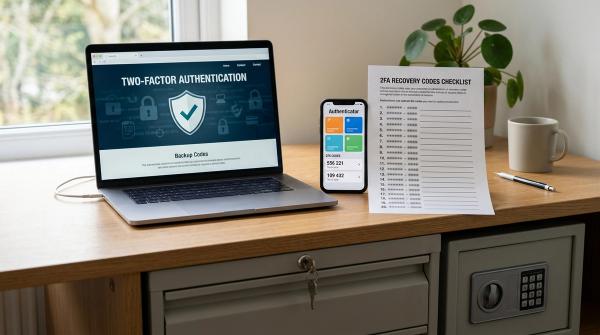
Backup Recovery Codes
#Recovery codes are one-time codes provided by many services when you turn on stronger login protection.
Good for:
- Getting back in if your phone is lost
- Emergency recovery
- Avoiding dependence on SMS
Store them securely. Don’t keep them as a plain screenshot in your photo gallery. That’s convenient, but not very safe.
What To Do If Your Phone Suddenly Loses Signal
#If your phone suddenly loses service and you suspect a SIM swap, act quickly. Try to stay calm, but don’t wait too long.
1. Check Basic Causes Briefly
#Before assuming fraud, do a quick check:
- Toggle airplane mode on and off
- Restart your phone
- Check whether others nearby have mobile service
- See if your carrier app or website shows an outage
- Check whether your bill or prepaid plan has expired
But don’t spend too much time here if you also see password reset emails, account alerts, or suspicious login notifications.
2. Connect to Wi-Fi
#Use trusted Wi-Fi so you can access email, banking apps, carrier support, and account settings.
Avoid entering sensitive passwords on public or unknown Wi-Fi if possible.
3. Contact Your Carrier Immediately
#Use another phone if needed. Call your carrier’s official customer support or fraud support number.
Say clearly:
“My phone suddenly lost service, and I suspect an unauthorized SIM swap or port-out. Please check whether my number was moved to another SIM, eSIM, or carrier.”
Ask them to:
- Suspend unauthorized SIM activity
- Restore your number to your SIM or issue a new SIM
- Add or reset a Port-Out PIN or Number Lock
- Review recent account changes
- Remove unauthorized users or devices if any
You may need to verify your identity. In some cases, the carrier may ask you to visit an official store with ID.
4. Secure Your Email
#Your email is urgent because it may be the recovery point for everything else.
Using Wi-Fi, try to log in to your main email account and:
- Change the password
- Sign out of unknown devices
- Check recovery phone and email settings
- Check forwarding rules and filters
- Review recent security activity
- Add or confirm authenticator app, passkey, or security key protection
Use official help pages from your email provider, such as Google, Apple, Microsoft, Yahoo, or your workplace IT team.
5. Contact Your Bank or Payment Provider
#If your banking number is affected, contact your bank through official support channels.
Ask about:
- Temporarily blocking suspicious transactions
- Freezing cards or accounts if needed
- Reviewing recent login and transaction activity
- Updating your registered mobile number only after your carrier issue is resolved
- Securing your mobile banking device registration
During this time, don’t trust incoming calls claiming to be from bank support. Call the official number yourself.
6. Protect WhatsApp and Social Accounts
#If you can still access WhatsApp:
- Check linked devices
- Remove unknown devices
- Turn on two-step verification if it isn’t already enabled
For social media accounts:
- Change passwords
- End unknown sessions
- Check recovery email and phone settings
- Remove unknown connected apps
- Warn close contacts if someone may be impersonating you
7. Report Through Official Channels
#Reporting options depend on your country.
- In the US, the FTC and FCC provide guidance and complaint channels for fraud and phone-related issues.
- In India, you can use the National Cyber Crime Reporting Portal or contact local cyber police.
- In other countries, use your national cybercrime reporting portal, telecom regulator, police, or consumer protection agency.
Also follow the official support process of your carrier, bank, email provider, WhatsApp, and affected platforms.
Comparison Table: SIM Swap Protection Options
#Quick SIM Swap Prevention Checklist
#If you only have 20 minutes, do these first:
- Ask your carrier for a Port-Out PIN, Number Lock, or SIM swap protection
- Turn on WhatsApp two-step verification
- Move your main email from SMS OTP to an authenticator app, passkey, or security key
- Save backup recovery codes for your email
- Check your bank’s security settings and alerts
- Use unique passwords for carrier, email, banking, and social accounts
- Add a SIM PIN only after checking your carrier’s official instructions
- Tell family members never to share OTPs, SIM PINs, or account passwords over calls or messages
General Safety Disclaimer
#This guide is for general safety awareness and education. Security settings, names, and recovery steps vary by country, carrier, bank, and platform.
For urgent cases, use official support channels only: your mobile carrier, bank, email provider, WhatsApp help, social platform support, workplace IT team, telecom regulator, cybercrime portal, or local authorities.
If you believe money has been stolen or a crime is in progress, contact your bank and local law enforcement as soon as possible.